
IRMA: ISMS components and registers
This page is for CISOs, compliance officers, quality managers, buyers and everyone who keeps the running ISMS up to date. It explains how to follow the cycle of a certification, prepare and record a management review, show that staff are competent and aware, carry out ISMS changes in a controlled way, and how to use the supporting registers.
New to IRMA? Start with IRMA: getting started. Risks are covered in IRMA: risk management. Controls, frameworks, the Statement of Applicability, audits and nonconformities are covered in IRMA: controls and audit. The privacy registers are covered in IRMA: privacy.
The IRMA app is in Dutch. This page quotes its labels in Dutch, with an English gloss in parentheses. What you see depends on the modules turned on for your organization, on your role and on the ISMS phase. Certificering (Certification), Directiebeoordeling (Management review) and Bewustwording (Awareness) are only in the menu in the Onderhoud (Maintenance) phase. See The ISMS phase.
Where you find it
Section titled “Where you find it”| Menu | Menu items | On this page |
|---|---|---|
| ISMS | Certificering, Directiebeoordeling, Competentie (Competence), Bewustwording | ISMS components |
| Registers | ISMS-wijzigingen (ISMS changes) | ISMS changes |
| Registers | Leveranciers (Suppliers), Subverwerkers (Subprocessors), Contracten (Contracts), Verplichtingen (Obligations) | Suppliers, contracts and obligations |
| Registers | Assets, Informatiesystemen (Information systems), Incidenten (Incidents) | Assets, information systems and incidents |
| Registers | Personenregister (People register), Projecten (Projects), Belanghebbenden (Stakeholders), Organisatiedoelen (Organizational goals) | People, projects, stakeholders and goals |
| Registers | Informatiebeheer (Records management) | IRMA: reporting, import and export |
All registers work the same way: opening, editing, filtering, exporting and importing a row is described under Working with registers.
ISMS components
Section titled “ISMS components”Certification
Section titled “Certification”Open ISMS → Certificering. Here you follow the external certification cycle, from the first audit to recertification. IRMA keeps track of the cycle; the certification itself is done by a certification body.
- Click Cyclus instellen (Set up cycle) and choose the stages and the frequency. Fase 1 (Stage 1), Fase 2 (Stage 2) and Gecertificeerd (Certified) are always part of the cycle. Choose which surveillances and which recertification your standard has, and set the Surveillance-interval (maanden) and the Hercertificering-interval (maanden). If you leave an interval empty, the default applies: 12 months for surveillance and 36 for recertification. The cadence determines the expected dates for the re-audit in the annual planning.
- The Cyclusoverzicht (Cycle overview) shows the Certificerende instelling (Certification body), the Volgende audit (Next audit) and how many Stappen behaald (Steps achieved) there are.
- Voortgang cyclus (Cycle progress) shows the life cycle. Every stage is Voltooid (Completed), Huidig (Current) or Gepland (Planned), with the status Gepland, Bezig (In progress), Behaald (Achieved) or Afgewezen (Rejected).
- Geldigheid certificaat (Certificate validity) counts down to expiry: Geldig (Valid), Verloopt binnenkort (Expires soon), Verlopen (Expired) or Geen certificaat (No certificate). Under Volgende surveillance (Next surveillance) the countdown to the next audit is shown.
A certification deadline can give a notification; see Setting up notifications.
Management review
Section titled “Management review”Open ISMS → Directiebeoordeling. This is the management review of the ISMS (ISO 27001, clause 9.3). At the top are the counters Beoordelingen (Reviews), Besluiten (Decisions), Actiepunten (Action points) and Agendapunten (Agenda items).
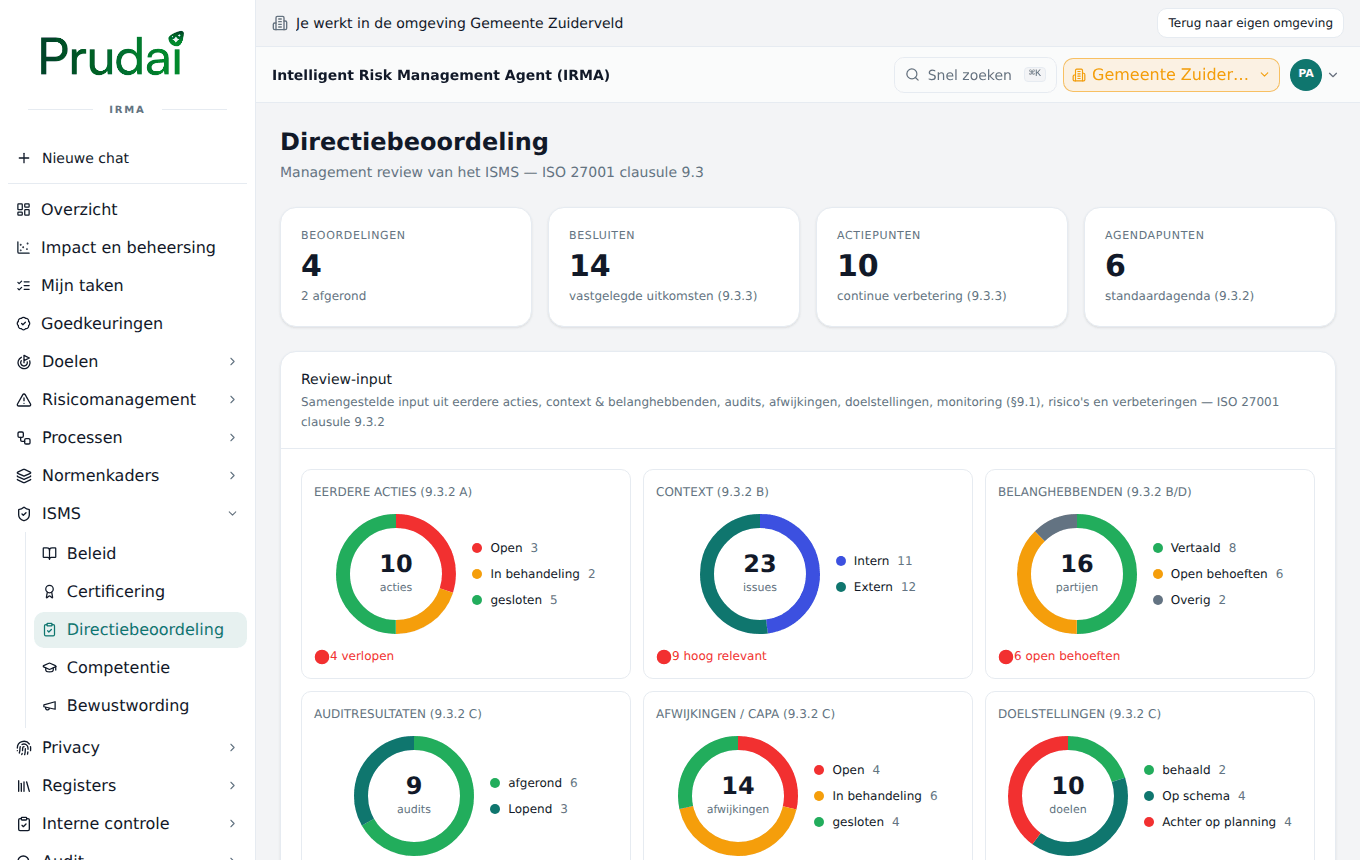
- Review-input is compiled by IRMA itself from your registers (clause 9.3.2): earlier actions, context, stakeholders, audit results, nonconformities (CAPA), objectives, monitoring and measurement, risks, improvements and the planned ISMS changes. This way an up-to-date picture is ready without anyone retyping figures. The overview of ISMS changes counts files per phase; it is not a conformity judgment.
- The Standaardagenda (Standard agenda) shows the mandatory topics of the review.
- Under Beoordelingen are the held and planned management reviews. Click a review and choose Beoordeling openen (Open review) for the decisions and action points.
- Record a held review with Beoordeling vastleggen (Record review): the Titel, the Datum, a Onderwerp (Topic, or Algemeen, General), the Genomen besluit (Decision taken, 9.3.3) and an Actiepunt with an Eigenaar and a Streefdatum (Target date).
- Under Actiepunten are the open improvement actions from earlier reviews.
Competence
Section titled “Competence”Open ISMS → Competentie. In the Competentieregister (Competence register) you record per role which competence is needed for the ISMS and what shows that someone has it (ISO 27001, clause 7.2).
- Click Toevoegen (Add) and in the Competentie toevoegen (Add competence) window fill in the Rol (Role), the Vereiste competentie (Required competence), the Bewijs (Evidence, a short note), the Eigenaar (Owner) and the Status. If you like, set the Huidig niveau (Current level) and the Streefniveau (Target level).
- Under Niveaus (Levels) you create your own level scale, for example Aware, Competent, Expert.
- With Documenten (Documents) you link the documents that show the competence, such as training. Without a link, the evidence is still missing.
- At the top are Rollen (Roles), Voldoet (Meets) and Hiaten (Gaps), and the Competentiedekking (Competence coverage): the distribution of your roles by competence status.
Awareness
Section titled “Awareness”Open ISMS → Bewustwording. In the Bewustwordingsregister (Awareness register) you record awareness campaigns (ISO 27001, clause 7.3).
- Click Toevoegen and in the Campagne toevoegen (Add campaign) window fill in the Campagne, the Doelgroep (Target group), the Voltooiing (%) (Completion), the date Uitgevoerd op (Carried out on), the Eigenaar and the Status.
- If you like, link a Competentie and record a measurement: the Soort meting (Kind of measurement), the Meetwaarde (Value) and the Eenheid / toelichting (Unit / explanation), for example how many employees clicked a simulated phishing mail.
- Voltooiing in beeld (Completion at a glance) shows the average completion and the completion per target group.
IRMA keeps the campaigns and the outcome. It does not give the training or the test itself.
ISMS changes
Section titled “ISMS changes”Open Registers → ISMS-wijzigingen. Here you control changes to the ISMS (ISO 27001, clause 6.3): you plan a change, assess the impact and record the decision, the implementation and the verification.
- Click Wijziging voorstellen (Propose change) and fill in the Titel, the Aanleiding (Reason), the Omschrijving (Description) and the Soort (Kind): Beleid (Policy), Proces (Process), Techniek (Technology), Organisatie (Organization) or Overig (Other).
- Under Geraakte objecten (Affected objects) link the documents, risks, controls, processes, suppliers, tasks or measurement programmes that the change touches. If a link changes later, IRMA asks for a new impact assessment.
- A change goes through the Wijzigingscyclus (Change cycle): Voorgesteld (Proposed), Beoordeeld (Assessed), Goedgekeurd (Approved), Doorgevoerd (Implemented), Geverifieerd (Verified). You use the buttons Impact bevestigen (Confirm impact), Goedkeuren or Afwijzen (with the Motivering besluit, Justification of the decision), Uitvoering vastleggen (Record implementation, with the Bewijs van uitvoering) and Verificatie vastleggen (Record verification, with the Verificatie-uitkomst). At every step IRMA records who did it and when.
- With Laat de assistent een impactvoorstel maken (Have the assistant draft an impact proposal) you ask the IRMA assistant for a proposal for the impact. That proposal shows with the change as AI-voorstel · niet geverifieerd (AI proposal, not verified); you check it and the sources before you confirm the impact.
At the top is Clausule 6.3: vastgelegd wijzigingsbewijs (Clause 6.3: recorded change evidence): how many changes are verified and how many are still running. That is a count of files, not a certification or conformity judgment.
Suppliers, contracts and obligations
Section titled “Suppliers, contracts and obligations”Suppliers
Section titled “Suppliers”Open Registers → Leveranciers. The Leveranciersregister (Supplier register) contains the suppliers, cloud providers and tooling that matter for the ISMS. At the top are Leveranciers, Met DPA (With DPA) and Hoog kritiek (Highly critical).
Per supplier you record: Naam, Dienst / asset (Service / asset), Type, Kritiekheid (Criticality), Regio / doorgiftegrondslag (Region / transfer basis), Data-impact, whether there is a Verwerkersovereenkomst (DPA) (Data processing agreement), the Contract / DPA-status, the Assurance / certificering and the Status (Actief (Active), Uitgefaseerd (Phased out) or Beëindigd (Ended)).
The Due-diligence-checklist belongs to each supplier: add points with Checklistpunt toevoegen… (Add checklist point) for the assessment of a new supplier and for the periodic review, and set each point with Status wijzigen (Change status) to Open, Voldaan (Fulfilled) or N.v.t. (Not applicable).
Subprocessors
Section titled “Subprocessors”Open Registers → Subverwerkers. Per subprocessor or technical service provider you record the Rol / verwerking (Role / processing), the Regio, the Doorgiftegrondslag, the Data-categorie, the Toegang tot dossierinhoud (Access to case content), the Kritiekheid and the Status (Actief, Fallback or Inactief).
With Zichtbaarheid (Visibility) you decide what goes outside: a public line is the basis for the list in your Trust Center, a restricted line stays internal. A Publicatie-opmerking (Publication note) and the Open actie (Open action) record what still has to be done.
Contracts
Section titled “Contracts”Open Registers → Contracten. Per contract you record the Naam, the Leverancier (optional, from the supplier register), the Startdatum, Einddatum (End date), Opzegtermijn (maanden) (Notice period in months), the Waarde (€) (Value, optional), the Eigenaar and the Status: Concept (Draft), Actief, Opgezegd (Terminated) or Beëindigd.
IRMA works out the latest termination date for you: the end date minus the notice period. In the column Opzegdeadline (Termination deadline) you see that date, and the counter Aandacht nodig (Needs attention) counts the contracts whose termination deadline is approaching or has passed.
Obligations
Section titled “Obligations”Open Registers → Verplichtingen. The Verplichtingenregister (Obligations register) contains the legal, regulatory and contractual requirements that apply to your organization (Annex A 5.31). Per obligation record the Naam, the Bron (Source) and a Omschrijving, and link the controls that put it into practice. The counters Gekoppelde maatregelen (Linked controls) and Zonder maatregel (Without control) show which obligations do not have a control yet (vereist aandacht, needs attention).
Assets, information systems and incidents
Section titled “Assets, information systems and incidents”Assets
Section titled “Assets”Open Registers → Assets. The Bedrijfsmiddelenregister (Asset register) contains your information assets, classified on confidentiality, integrity and availability. Record the Naam, the Type, the Soort (Kind), the three classifications (Vertrouwelijkheid, Integriteit, Beschikbaarheid; together CIA) and the Eigenaar.
Information systems
Section titled “Information systems”Open Registers → Informatiesystemen. This is the part of the assets with the Soort Informatiesysteem. Systems support the processes; on an information system you carry out a DPIA. The counters Met DPIA and Review verlopen (Review overdue) show which systems still need an assessment. The importance of your information systems for your business goals, set against the degree of control, is on the dashboard Impact en beheersing.
Incidents
Section titled “Incidents”Open Registers → Incidenten. Here you record an incident or look at reports from monitoring. An incident has a Bron (Source, for example Handmatig (Manual), Agent or VPS), a Ernst (Severity: Laag, Middel, Hoog, Kritiek), a Status (Nieuw (New) to Afgehandeld (Handled)) and the number of Voorvallen (Occurrences). Open an incident for the details: the origin, the time, the impact, the linked entities (system, supplier, process, risk) and the handling with Opgelost op (Resolved on) and Remediatie (Remediation).
- With Bestand toevoegen (Add file) you add a photo, PDF or Word file, up to 10 MB per attachment.
- A system of your own can deliver incidents automatically with a service token; see Service tokens. The delivering system gives every report a key, so a repeat of the same report does not produce a duplicate incident.
You register a data breach in the data breach register.
People, projects, stakeholders and goals
Section titled “People, projects, stakeholders and goals”People register
Section titled “People register”Open Registers → Personenregister. This is the address book for assessments: name, role, email address and department. People with an email address can be invited by mail for an assessment questionnaire; people without one cannot be invited by mail. To a person you can attach the Gekoppeld account (Linked account), so that risks and exports show the name instead of an account ID. You also need this linking for read access per department.
Projects
Section titled “Projects”Open Registers → Projecten. Projects are deliberately light: name, description, owner and status (Actief, Afgerond (Completed) or Gestopt (Stopped)). You link risks to a project. There are no periods or budgets.
Stakeholders
Section titled “Stakeholders”Open Registers → Belanghebbenden. The stakeholder register contains the parties that matter for your ISMS, with their needs and expectations (ISO 27001, clause 4.2). You translate a need into an obligation; the counter Vertaald (Translated) shows how many needs that already is.
Organizational goals
Section titled “Organizational goals”Open Registers → Organisatiedoelen. These are the organization’s goals, broader than the objectives of the ISMS. Record the Naam, the Omschrijving, the Eigenaar (a role), the period (Periode van and Periode tot) and the Status: Concept, Actief, Gerealiseerd (Achieved) or Vervallen (Lapsed). You link strategic risks to a goal. The objectives and the context of the ISMS are covered in IRMA: controls and audit.