
SharePoint
Is the file already in SharePoint? Sign in with your Microsoft account and pull in an entire site, a document library, or a selection of folders and files in one go, with no downloading and uploading one by one. The integration uses Microsoft Graph with delegated access: everything runs under the signed-in user’s identity and permissions. What you are not allowed to see in SharePoint, you will not see here either.
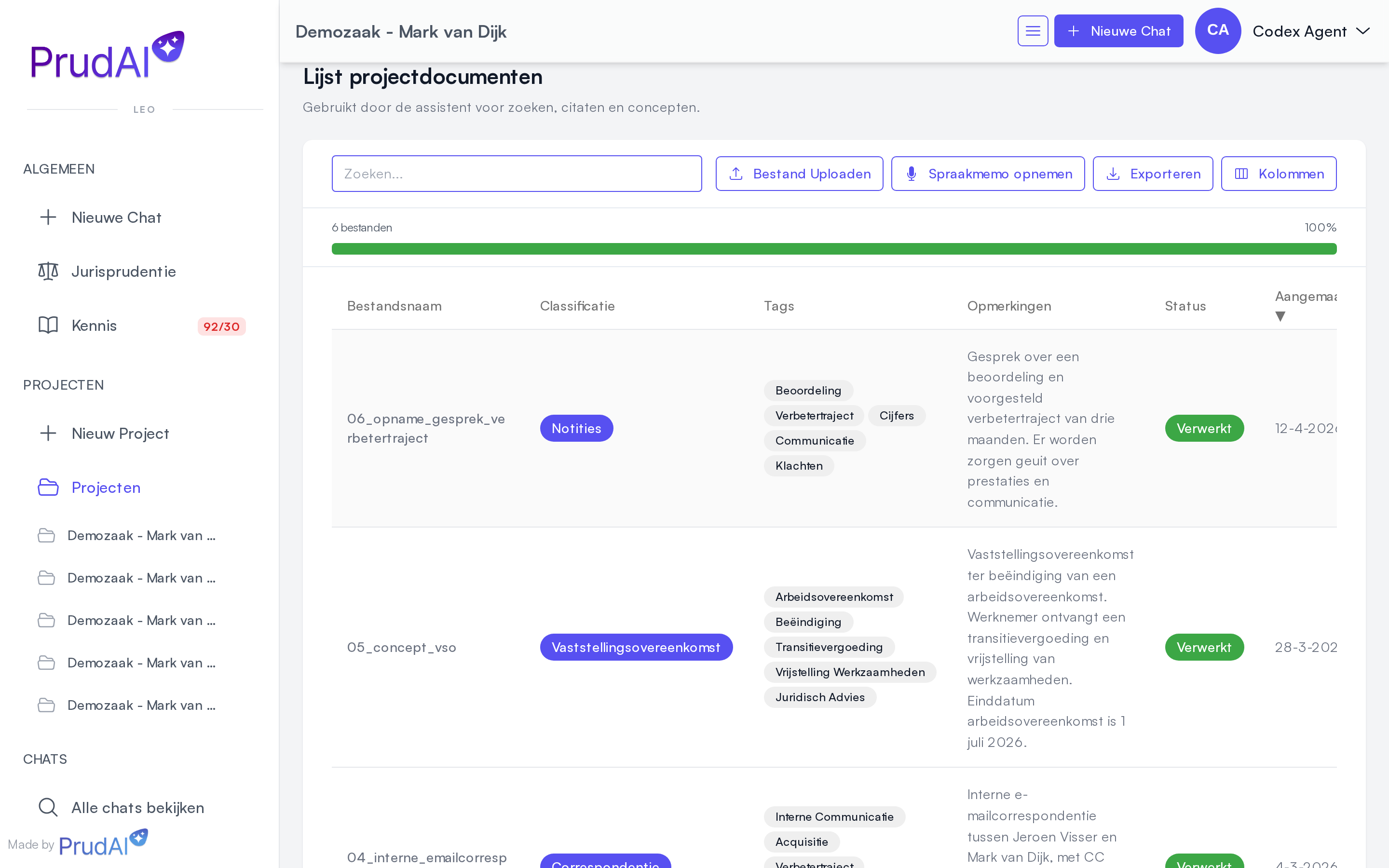
You can use SharePoint in three places:
- in a dossier or project: the documents of one matter, linked to one document library;
- in an organization knowledge base: knowledge for the whole firm, such as templates and handbooks;
- in the chat of LEO and LEO Fiscaal: you ask LEO to put documents from SharePoint into the dossier.
SharePoint stays the source. Prudai never writes back to SharePoint: changes travel to you through the sync, never the other way around.
When does SharePoint work?
Section titled “When does SharePoint work?”Three things have to be in place. Prudai arranges the first two; the third is up to you.
| Requirement | Who arranges it | What you see when it is missing |
|---|---|---|
| Your organization has the SharePoint integration. | Prudai | ”SharePoint integration is not enabled for your organization.” |
| The Microsoft connection is set up on Prudai’s side. | Prudai | ”SharePoint integration is not configured.” |
| You are signed in with your Microsoft account. | you | ”Not connected” |
What your IT administrators need to do for this (grant consent in Microsoft once) is described in the SSO and SharePoint admin guide.
“Not connected” is almost never an outage. It means you are not signed in with your Microsoft account, for example because you came in with a username and password. SharePoint may be working fine for your colleagues at that very moment. There is no connect button and no settings screen to fix this: sign out and sign back in using the Microsoft button on the sign-in screen, under Or sign in with.
Creating a dossier or project from SharePoint
Section titled “Creating a dossier or project from SharePoint”Importing from SharePoint is a creation path inside the new-dossier window, not a separate button in the list.
- In the sidebar, open Dossiers (in LEO and LEO Fiscaal), Projects (in VERA, ZIA and BEVER) or Folders (in MAIA).
- At the top of the list, click the dashed New dossier row. The window that opens is called New Dossier in LEO and LEO Fiscaal, New Project in VERA, ZIA and BEVER, and New folder in MAIA.
- In the window, click Import from SharePoint. Anything you had already typed comes along.
- Pick a SharePoint site. The name field doubles as the search box here: with no text the list shows Recent sites, and as soon as you type it searches along under Search sites. You can search by site name, but you can equally paste a site URL or the tenant hostname and the right site will be looked up.
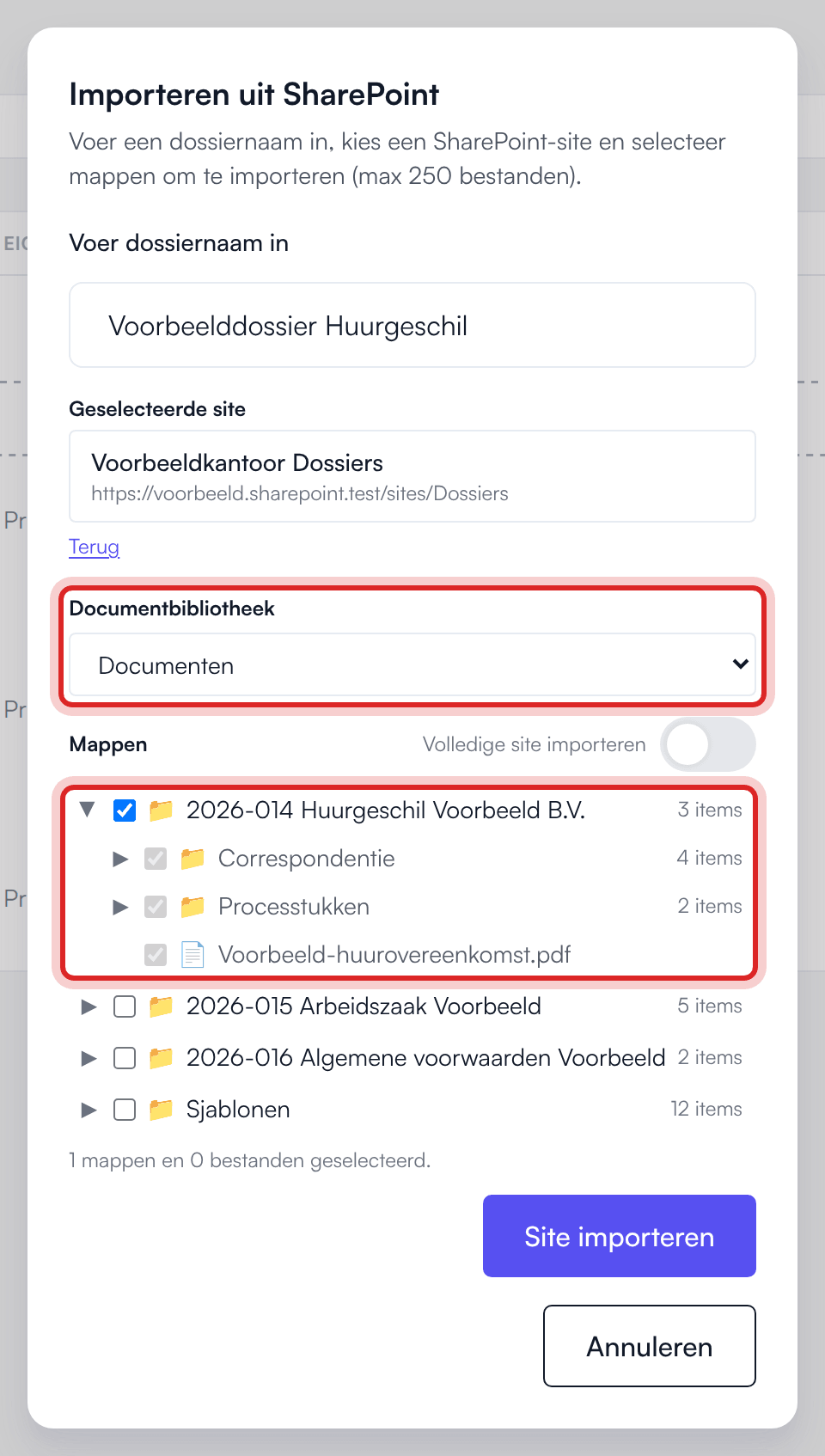
- Choose a Document library if needed (see below).
- Select folders and files, or switch on Import entire site.
- Click Import site.
The dossier is created with the name of the chosen site, and you land in it straight away. Want a different name? Rename the dossier afterwards. The import runs in the background: you see “SharePoint import started in the background.” and can keep working. If the import fails after creation, the dossier stays and the message tells you why.
If you do not see the Import from SharePoint button, your organization either does not have the SharePoint integration or Restrict uploads is on (see below).
Want to see only the dossiers linked to SharePoint later on? In the list, choose Filter → Linked to SharePoint.
Choosing a document library
Section titled “Choosing a document library”A SharePoint site can hold more than one document library, for example a general one and a departmental one. That is why there is a Document library selector between the site choice and the folder tree:
- if the site has one library, the app skips the choice and shows the folders straight away;
- if the site has several libraries, you pick one first. Until you do, you see “Choose a document library first to browse its folders.”
A dossier belongs to one document library. Everything you add later comes from that same library.
Choosing folders and files
Section titled “Choosing folders and files”The picker is an expandable tree:
- expand a folder to see what is inside; the contents are fetched at that moment;
- the tree shows folders as well as individual files;
- you can select at any level, so a folder deep in the structure or a single file works too;
- ticking a folder includes everything underneath, subfolders too. The items below then render as ticked and greyed out, because they are already included;
- the Import entire site switch takes everything and replaces the manual selection;
- at the bottom there is a running count of your selection, in the form “{n} folders and {n} files selected.”
Adding more folders
Section titled “Adding more folders”If you picked folders in the first import (rather than the entire site), the dossier has an Add folders button. You get the same tree, within the library the dossier is linked to. New folders count toward the maximum of 1000 SharePoint files per dossier.
Only the owner of the dossier can import from SharePoint or add folders, with their own Microsoft permissions. Colleagues you share the dossier with do see the documents.
From the chat: LEO fetches documents from SharePoint
Section titled “From the chat: LEO fetches documents from SharePoint”In LEO and LEO Fiscaal you do not have to click through the picker yourself. If your organization has the SharePoint integration and you are signed in through Microsoft, you can simply ask LEO.
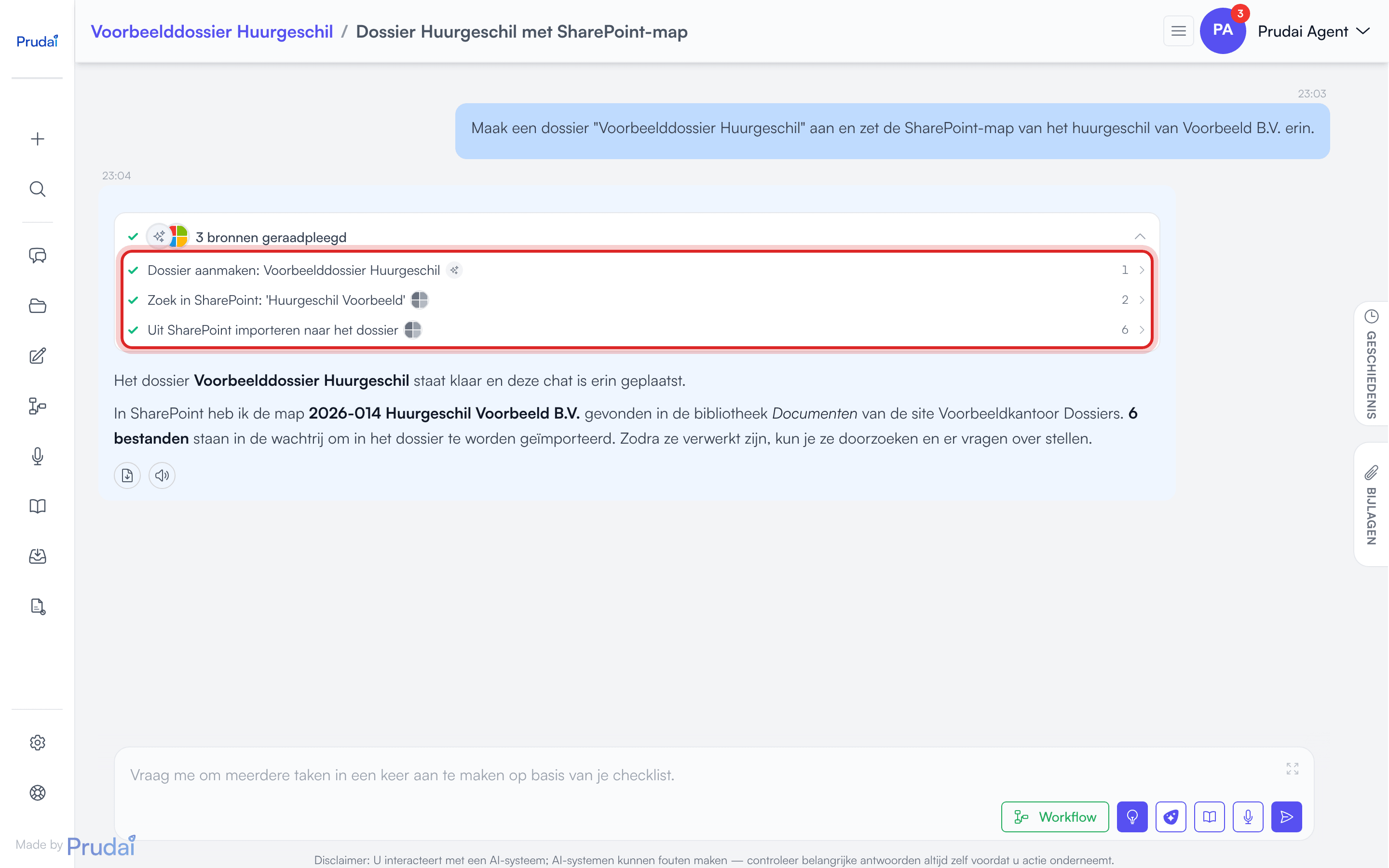
Having a dossier created. If your conversation is not in a dossier yet, ask LEO to make one, for example: “Create a dossier ‘Lease dispute Example Street’ and put the Correspondence folder in it.” LEO creates the dossier and the conversation moves along with it. In the chat you then see Create dossier: …. LEO only does this when you ask. Having a dossier created also works without the SharePoint integration.
Searching and browsing. LEO looks in SharePoint with your permissions: sites, libraries and folders, or a search for files across all your sites. You then see, for example, Browse SharePoint sites, Browse a SharePoint folder or Search SharePoint: ’…’. Looking changes nothing anywhere.
Importing. When you ask for documents to go into the dossier, LEO imports them into this conversation’s dossier (Import from SharePoint into the dossier). Your request is the approval: there is no extra confirmation question. LEO reports how many files, and which ones, are queued. The import runs in the background; if you ask about progress later, you see Check SharePoint import status.
The same rules apply as with the buttons:
- LEO only imports into the conversation’s dossier. If the conversation is not in a dossier, LEO says so, unless you asked for a new dossier;
- only the owner of the dossier can import;
- a dossier imports from one document library;
- the maximum of 1000 SharePoint files per dossier still applies;
- if Restrict uploads is on, LEO does not import;
- nothing is ever written back to SharePoint.
More about dossiers: Projects. More about the chat: Chat.
Syncing
Section titled “Syncing”A linked dossier checks by itself whether anything changed in SharePoint, as long as you have it open. Above the document list you see the Linked site and one of three labels:
| Label | Meaning |
|---|---|
| Up to date | Nothing changed in SharePoint. No action needed. |
| {n} updates available — sync required | There are changed or new files. Click Sync now. |
| Full synchronisation required | See below. Here too, just click Sync now. |
The Sync now button only appears when there is something to sync. Afterwards you are told how many files were updated and deleted.
”Full synchronisation required” is not an error
Section titled “”Full synchronisation required” is not an error”To know what changed, the app keeps a change trail it receives from Microsoft. Microsoft occasionally invalidates that trail, for instance when it has not been used for a long time or when something structural changed in the library. The app then lists the library in full again and compares it with what your dossier already holds.
What that means for you:
- you lose nothing; files that did not change are not re-downloaded or re-processed;
- it takes a bit longer than a normal sync, once;
- nothing has to be set up again.
There is a safety stop built in. In these cases such a full sync stops before anything is removed, and the message explains what is going on:
- SharePoint returns an empty list. Try again. If it keeps happening, contact support.
- More than half of the documents would disappear in one go. Contact support. If the removal is correct (the library really was emptied, for example), support lets the sync through.
- The library is too large to list again in one pass. Contact support; they resynchronise it for you.
Opening documents in SharePoint
Section titled “Opening documents in SharePoint”If a document came from SharePoint, the document menu shows Open in Word instead of Preview. You then open the file in SharePoint itself and edit it there. PDFs keep Preview, with the built-in viewer.
Linking SharePoint to an organization knowledge base
Section titled “Linking SharePoint to an organization knowledge base”Besides dossiers, you can link an organization knowledge base to a SharePoint site. That is the route for knowledge that belongs to the whole firm rather than to one matter: templates, handbooks, internal guidance. The knowledge base then stays in step with SharePoint. As an owner of your organization you create and manage organization knowledge bases on Knowledge.
You can link at two moments.
While creating it. In the creation window, under Link to SharePoint, switch on Import from SharePoint. The button at the bottom then changes to Create and import.
Afterwards. Open the knowledge base and click Link to SharePoint in the SharePoint sync panel. You get the same picker as for a dossier: site, document library, then folders and files or Import entire site.
Once linked, the SharePoint sync panel shows the site, the selected folders (or Entire site), and when it last synced. There are three buttons:
| Button | What it does |
|---|---|
| Sync now | Fetches the changes and reports how many files were updated and deleted. |
| Check for changes | Looks once whether anything is pending, without syncing. |
| Disconnect | Stops syncing. The knowledge base and its documents stay; they simply no longer follow SharePoint. |
One difference from a dossier: the knowledge base does have a Check for changes button; a dossier checks by itself and has no such button.
If something went wrong during the last sync, the reason appears in the same panel under Last sync error.
Limits
Section titled “Limits”| Where | Maximum number of SharePoint files |
|---|---|
| Dossier or project | 1000, in total |
| Organization knowledge base | 1000, in total |
The maximum applies to everything from SharePoint in it, not per import: what you add later with Add folders or through LEO counts too. If your selection is too large you see “Maximum {n} files can be imported.” Then pick only the folders you really need. If a sync would go over the maximum, the message says so; narrow the selection or contact support.
Beyond that: large sites take longer, and the permissions you hold in SharePoint decide what comes in.
If uploads are restricted
Section titled “If uploads are restricted”If Restrict uploads is on for the persona you work in, you cannot link a new SharePoint source to a dossier or project:
- the Import from SharePoint button is not in the new-dossier window;
- Add folders disappears;
- LEO does not import from the chat.
Anything already linked keeps syncing: Sync now keeps working.
Exception for the organization knowledge base. An owner of the organization can still add documents to the organization knowledge base and link a SharePoint source to it, also straight away while creating it (Import from SharePoint, then Create and import). For dossiers and the personal knowledge base the restriction applies to everyone.
For the other features your organization can switch off, see What your organization can switch off.
Common issues
Section titled “Common issues”- “Not connected”: you are not signed in with your Microsoft account. Sign out and sign back in with the Microsoft button. This is a personal session matter, not a firm-wide outage.
- “SharePoint integration is not enabled for your organization.”: your organization does not have the SharePoint integration. Prudai arranges this; ask your account manager or support.
- “SharePoint integration is not configured.”: the connection on Prudai’s side is not set up. That lies with Prudai, not with your IT administrators; contact support.
- No folders visible for a site: choose a Document library first.
- Importing or adding folders fails in a shared dossier: only the owner of the dossier can do that. Ask the owner.
- Permissions: you only see sites, libraries and folders you have read access to in SharePoint itself. If something is missing, request access from the site owner.
- Error messages: where a concrete reason is known, the app shows it instead of a bare “failed”. Read that sentence; it usually says exactly what needs to happen.
More help: Troubleshooting & support.