
Timeline (dossier documents)
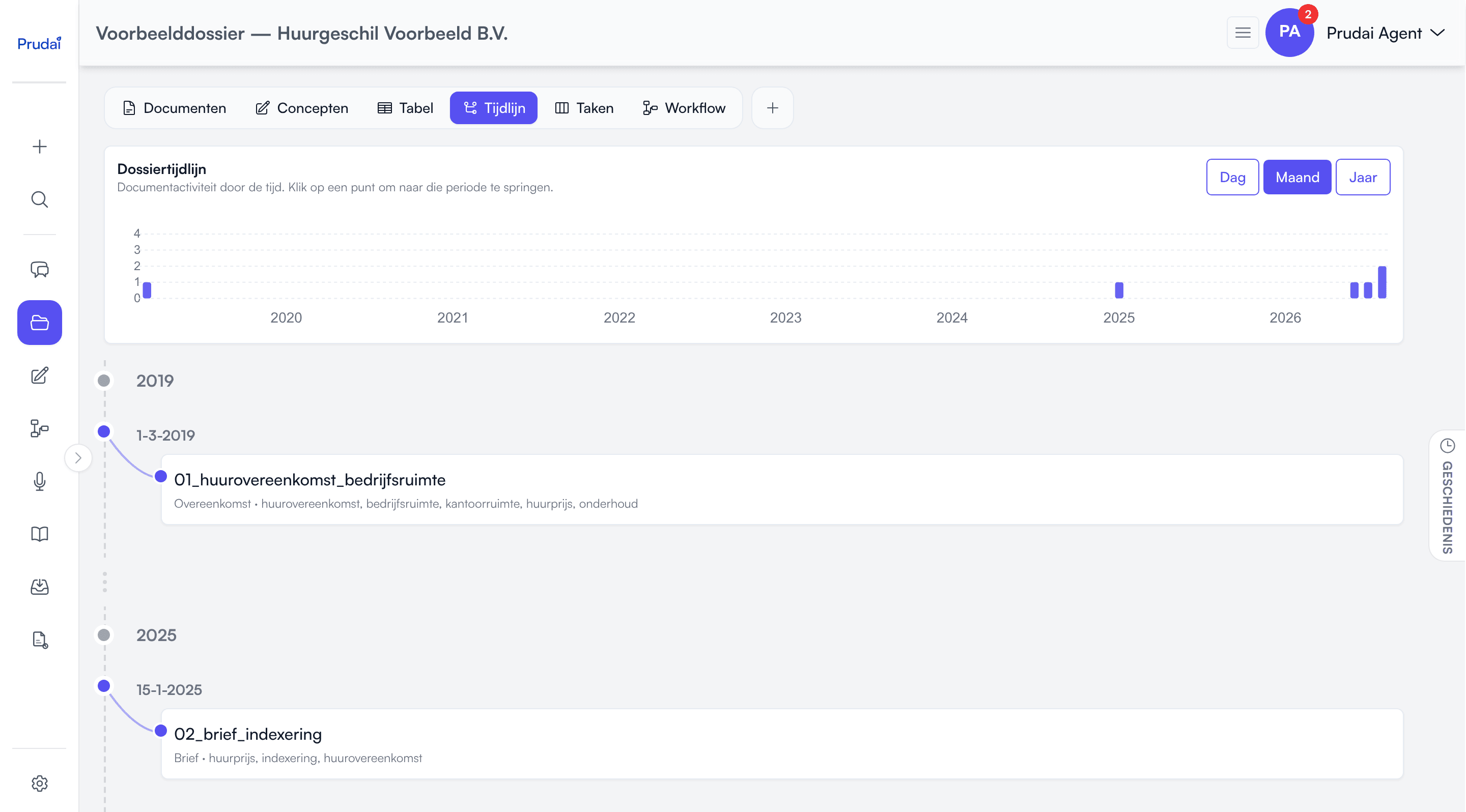
The timeline puts a dossier’s documents on a date axis so you can quickly understand what happened when. Directly usable for your statement of facts or hearing preparation.
LEO and LEO Fiscaal call the workspace this timeline lives in a dossier; VERA, ZIA, BEVER and IRMA call it a project, MAIA (on request) a folder. See Projects.
Where you open the timeline
Section titled “Where you open the timeline”The timeline is not a tab and not a page of its own. It is the Timeline segment of a dossier’s views pill. Click that segment and the timeline appears on the same page. The view is part of the page address, so a link or a refresh opens the timeline again straight away.
There is no separate timeline page any more. Everything it could do lives in this view.
The activity chart
Section titled “The activity chart”At the top sits the Dossier Timeline: a bar chart of how many documents fall in each period. It is the fastest way to see where the matter was busy and where it was quiet.
- Click a bar and the list below jumps to that period.
- Hover a bar for the period and the count.
- You can zoom horizontally into part of the chart.
The chart and the grouping in the list share one setting: pick a different granularity and both change with it.
Granularity: day / month / year
Section titled “Granularity: day / month / year”The Day, Month and Year buttons decide how the timeline groups:
- Month (the default, and usually the best starting point),
- Year (overview),
- Day (detail).
If your timeline spans more than a year and you pick Day, the app asks for confirmation first: “Your timeline spans more than one year. Viewing per day may be slower and visually dense.” That is a warning, not a block.
Reading the list
Section titled “Reading the list”Below the chart the documents appear in chronological order, with three aids:
- Year markers. Every new year gets a marker in the list, so you never have to guess which year you are looking at.
- Time jumps. When more than a year sits between two documents, a time-jump marker takes the place of empty space. A gap is visible as a gap.
- Expand and collapse. Days holding several documents start collapsed. Click to fold one open. Expand all and Collapse all do it for the whole list at once.
Documents without a usable date are grouped under No date.
Which date is used?
Section titled “Which date is used?”The timeline prefers:
- the File created at date from the document details, otherwise
- the date the document was uploaded.
Tip: if your timeline looks wrong, open Edit details in the document menu and check or correct File created at there.
What can you do from the timeline?
Section titled “What can you do from the timeline?”Every timeline row carries the same document menu as the document list: Preview (or Open in Word), Info, Edit details, Download, Translate, Chat and Delete. The full explanation per action lives on Projects.
Two practical points:
- after a download the download action greys out for a few seconds; that is a short pause, not an error;
- deleting asks for confirmation, and the row only disappears once the document has really been removed.