
Tasks
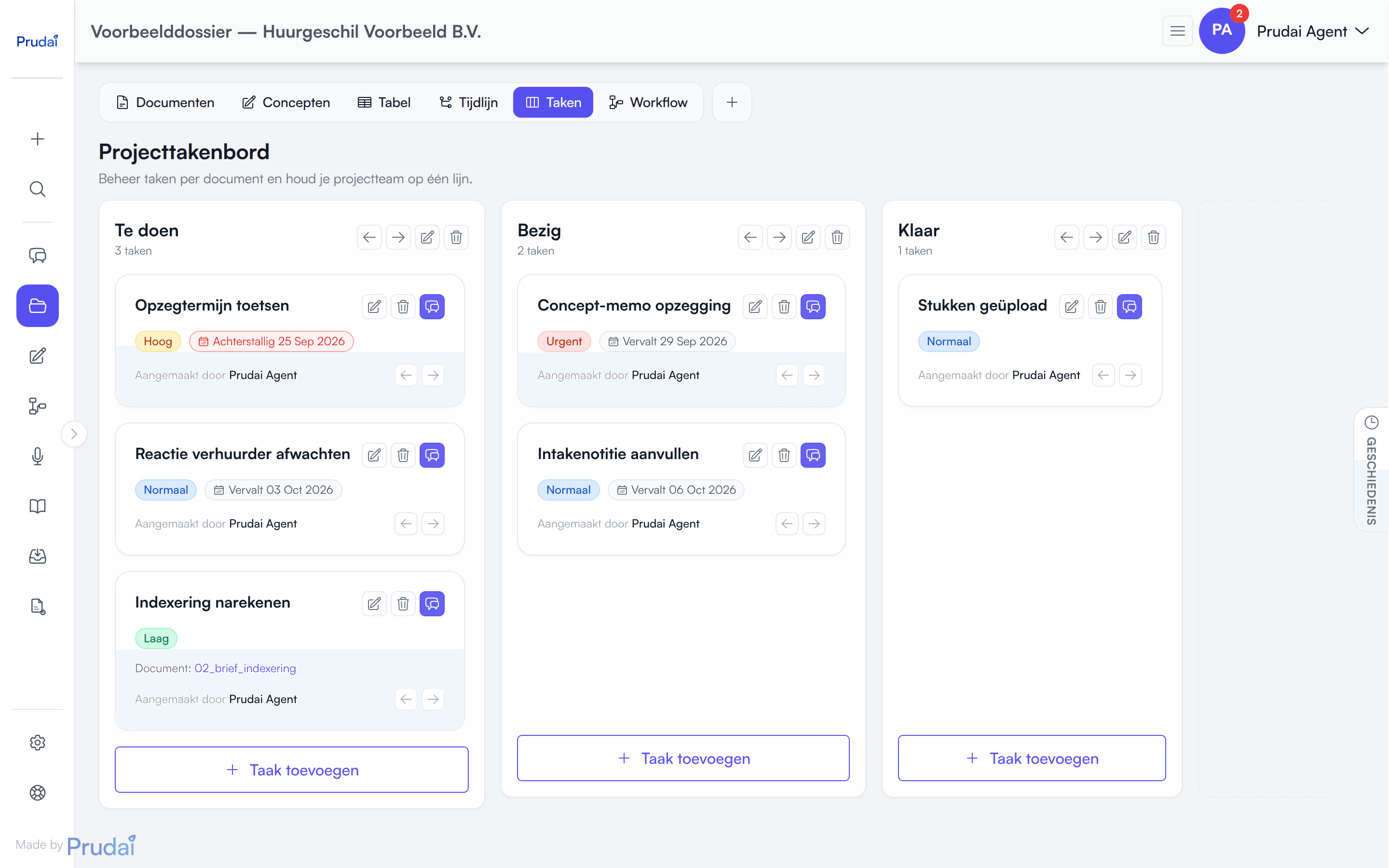
Each dossier has a task board (kanban-style) to plan and track work. Who drafts the statement, when is the expert report due? Put the procedural steps in your dossier as tasks, with due date, priority and assignee, and nobody on the matter misses a term again. This area used to be called “Kanban”; the application now labels it Tasks.
LEO and LEO Fiscaal call the workspace this board lives in a dossier; VERA, ZIA, BEVER and IRMA call it a project, MAIA (on request) a folder. See Projects.
Where you open the board
Section titled “Where you open the board”The board is not a page of its own. It is the Tasks segment of a dossier’s views pill. Click that segment and the board appears on the same page.
There are two more quick ways in:
- in the dossier list in My work, choose Tasks in a row’s ⋯ menu: the board then opens as a card in that dossier’s chat;
- old links to the task board keep working and land on the Tasks segment.
Want to send a colleague to the board? Open Tasks and copy the page address: the view is part of the link.
Columns
Section titled “Columns”You can:
- add columns through the dashed card to the right of the last column (Add column);
- rename columns (Rename column);
- delete columns (Delete column, with confirmation; move the tasks out first);
- shift columns left and right with the arrows in the column header.
The top of each column shows how many tasks it holds.
Tip: keep it simple. A classic setup:
- To do
- In progress
- Review
- Done
Create and manage tasks
Section titled “Create and manage tasks”A task can include:
- Title,
- Description,
- Status column,
- Assignee (optional),
- Due date (optional),
- Priority: Low, Normal, High or Urgent,
- Linked document (optional).
With a task you can:
- create it with Add task at the bottom of a column;
- edit it by clicking the task, or with the pencil icon (Edit task);
- move it to another column or another position in the same column;
- send it to the chat (Send to chat): the dossier chat opens with a reference to this task;
- delete it with the bin icon (Delete task, with confirmation).
There is no archive button for tasks. A task you no longer need is deleted.
A task card shows the priority, the due date (with Overdue once it has passed), the assignee, the linked document and who created the task at a glance.
A colleague you invited who does not have an active account yet cannot be assigned tasks. The app names who this applies to.
Dragging is the main interaction
Section titled “Dragging is the main interaction”You move tasks by dragging. Pick up a task card and drag it to the column where it belongs. The target column highlights while you hover over it, and the drop position follows your cursor: release halfway down and the card slots in between the two cards you dropped it between. So dragging sets the order inside a column too, not just the column itself.
Prefer clicking? The arrows at the bottom of a task card (Move left and Move right) shift the task one column over.
The board turns dragging off while an earlier change is still being saved, and on a read-only board.
Link tasks to documents
Section titled “Link tasks to documents”Link a task to a document when:
- the document is the evidence or source,
- you want everyone to use the same reference,
- you want quick navigation from task to source.
Documents in the dossier have an optional Review status column (see Projects) that pairs well with tasks for tracking what still needs review.
Use tasks in chat (#)
Section titled “Use tasks in chat (#)”In dossier chat you can mention tasks using # (or #"..." for names with spaces).
In LEO, LEO Fiscaal, ZIA, VERA and BEVER the assistant can also create, update, move and delete tasks for you when you ask. If Knowledge shows a Tasks switch, it has to be on. The chat then shows steps such as Create a task or Move a task.
Helpful prompts:
- “Split this task into 5 subtasks with priorities.”
- “Put the deadlines from this summons on the board as tasks, with due dates.”
- “Write a checklist for this task and reference relevant documents.”
More: Chat.