
Files
The upload rules on this page apply to three places at once:
- My Files (personal),
- dossier documents,
- chat attachments.
That matters: if a file type is supported here, you can normally upload it in a dossier or through chat as well.
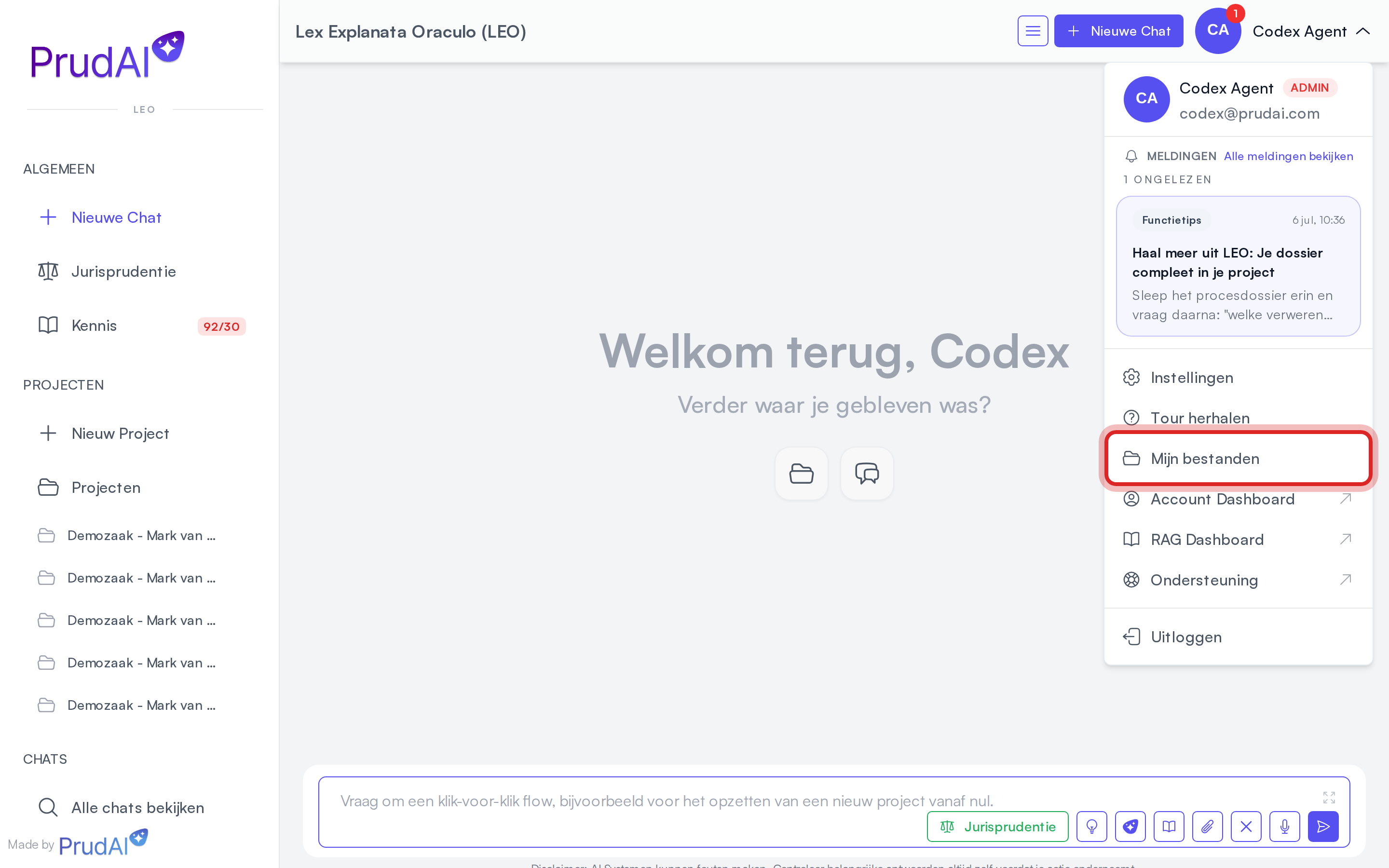
Your personal files double as your personal knowledge base: upload your model documents, standard clauses and reference material once and the assistant can draw on them afterwards. “Use our model confidentiality clause” then just works. In a conversation outside a dossier the assistant searches your personal files by default; in a dossier conversation it searches that dossier’s documents by default. You reach your files through My Files in your personal menu, top right; they live with the settings, under Personal knowledge base.
Supported file families
Section titled “Supported file families”| Family | Formats | What the app does with it | Practical notes |
|---|---|---|---|
| Documents | .pdf, .doc, .docx, .odt, .txt, .md, .json, .xml, .xlsx, .xlsm, .xls, .ods | stores the original, extracts the text and makes it searchable for search and chat | You view a PDF as the original, a Word or OpenDocument text file as a converted PDF, a spreadsheet as text. See Preview, text and download. |
| Presentations | .pptx, .ppt | processes the slide content for search and chat | Shown as a converted PDF in the preview screen. Translate supports .pptx only. |
.eml, .msg | processes the message and its attachments for search and chat | Useful for matter emails and mailbox exports. See Email: message and attachments. | |
| Images | .png, .jpg, .jpeg, .gif, .tif, .tiff, .bmp, .webp, .ico, .jfif, .pjpeg, .pjp, .svg, .heic, .heif | stores the image and reads it with image recognition | Photos, scans, screenshots, maps and drawings. See Images. |
| Audio | .mp3, .wav, .flac, .m4a, .m4b, .aac, .3gp, .caf, .ogg, .oga, .opus, .mp4, .webm, .amr, .wma, .aif, .aiff, .mpeg, .mpga | turns the recording into a transcript and makes that searchable | .mp3 is supported. Use this for dictations, WhatsApp audio and phone recordings. |
| Transcripts | .vtt, .srt | strips the timecodes and markup and makes the conversation searchable, speaker labels included | This is what Teams, Zoom and Word create for a recording. If you already have the transcript, upload that instead of the audio: it is faster and usually already says who spoke. Markup blocks (STYLE, NOTE, REGION) are deliberately dropped. |
| CAD | .dxf, .dwg | attempts to extract content for search and chat | Results depend on the quality of the drawing. |
| BIM | .ifc | extracts building model semantics: storeys, spaces, elements, materials and property sets | IFC 2x3 and IFC 4 are supported. Large models produce a summary, not raw geometry. |
| BIM coordination | .bcfzip | extracts issues, comments, status, priority and referenced IFC element GUIDs | BCF (Building Collaboration Format) clash reports and quality reviews. BCF 1.0-3.0 supported. |
| Point clouds | .e57 | reads the scan set’s metadata: number of scans, sensor, capture date and physical extent | Deliberately .e57 only (ASTM E2807). A point cloud has no text layer; what is citable is the metadata (“scan of 14-03, Leica RTC360, 42 x 18 x 7 m”). .rcs, .rcp and .lgs are not supported; both ReCap and Cyclone export to .e57. |
| Archive | .zip | extracts supported contents and processes them individually | Supported files inside the ZIP are processed; unsupported ones are skipped. Nested ZIPs are allowed within limits. |
Images: photos, screenshots, maps and drawings
Section titled “Images: photos, screenshots, maps and drawings”A photo, scan or screenshot has no text layer, so the app reads it with image recognition. This is how it works:
- First the app works out what kind of image it is: a screenshot of a chat conversation, a map, a drawing, a scan of a document or a photo.
- Then it reads the image with that in mind. For a chat screenshot it pays attention to who said what and when; for a map to parcel numbers and marked boundaries; for a drawing to the annotations and what they belong to.
- A large image, or a large map or drawing, is read in parts so that small details are not lost.
The assistant treats an image read this way as a source it has read, and does not dismiss a photo as “poor quality”. What image recognition still finds hard, such as handwriting or exactly what sits next to what, is worth checking in the image itself when in doubt.
An .svg that contains a lot of text is read directly from its own text layer. If it holds little text, the app reads the image with image recognition, just like a photo.
Email: message and attachments
Section titled “Email: message and attachments”Upload a .msg or .eml and the app reads the attachments as well as the message, so you can ask about them in chat:
- PDF, Word, Excel and other supported attachments;
- images, such as a photo pasted into the mail (up to ten per email);
- the contents of a ZIP attachment;
- a forwarded or attached email, including its subject, sender and date.
Small images such as logos and signatures are skipped. An attachment that was not included does not disappear silently: the document text then carries a line like Bijlage: … — niet geïndexeerd: … (“Attachment: … — not indexed: …”) with the reason. So you, and the assistant, know there was more in the mail.
Audio: from recording to searchable transcript
Section titled “Audio: from recording to searchable transcript”A recorded meeting, a memo dictated on your phone, an mp3 of a settlement call: upload the audio file and transcription runs automatically as part of processing. Then ask in chat “turn this recording into a report” or use the memo as input for a workflow.
Speech recognition knows the names in your own organization. When transcribing, it automatically receives your organization’s name, your colleagues’ names and “Prudai”, so those are spelled correctly more often. You do not need to set anything up, and it cannot be changed. It applies to uploaded audio, the Voice memo and the dictaphone; not to audio attached to an email.
Want to dictate instead of uploading a file? There are two places for that: Voice memo in the sidebar (record first, pick a dossier afterwards) and the dictaphone inside your dossier. See Voice memos.
If you already have a transcript from Teams, Zoom or Word (.vtt or .srt), upload that file rather than the audio. The transcription stage is then skipped, so it finishes sooner.
Uploading
Section titled “Uploading”This is how you add files:
- My Files and a dossier’s documents: through Upload File or by dragging files onto the list.
- Chat on a computer: drag files into the conversation, or open the Attachments handle on the right and choose Add files. There is no paperclip in the prompt bar on a computer.
- Chat on a phone or narrow screen: use the paperclip in the prompt bar (Attach files).
What you see next:
- ZIP files are uploaded first and then extracted and processed in the background. Large archives may take a while.
- A file can be at most 500 MB. Select files over 50 MB in the document list and you see the notice Large files selected; the upload still goes ahead.
- Outside a dossier chat you choose whether the upload goes to My Files, an existing dossier or a new dossier.
- Files you pick in chat via an
@mention land in the conversation’s Attachments drawer automatically. - Filenames containing em-dashes, smart quotes and other non-ASCII characters are supported.
One Word file in chat: attachment or document view
Section titled “One Word file in chat: attachment or document view”Add exactly one .docx in chat and the app first asks what you want to do with it:
- Add as an attachment: the assistant reads the document alongside this conversation, like any other attachment.
- Edit in document view: the document opens next to the chat, formatting preserved, and you keep working on it together with the assistant. See Drafts.
You get this question in LEO, LEO Fiscaal, VERA, BEVER and IRMA. With several files at once, other formats, the other personas and the Word add-in, the file is simply added as an attachment.
When your organization has disabled uploading
Section titled “When your organization has disabled uploading”You then cannot upload anything. In My Files and in dossiers the upload button disappears and you see Uploads are disabled by your organisation; in chat Add files and the paperclip are switched off, with the same notice as the explanation. Existing documents stay available: opening, downloading, translating and deleting keep working. See Restrict uploads.
The extension is the gate
Section titled “The extension is the gate”The app looks at the file extension, and at nothing else, to decide whether an upload is accepted. The MIME type your browser sends along does not count.
In practice that means:
- a file with the wrong or a missing extension is rejected, even when its content is perfectly fine. Rename it to the correct extension and try again;
- renaming a file to a supported extension does not help when the content is something else: the upload is then accepted, but processing fails.
The error message always names the allowed extensions.
Processing statuses
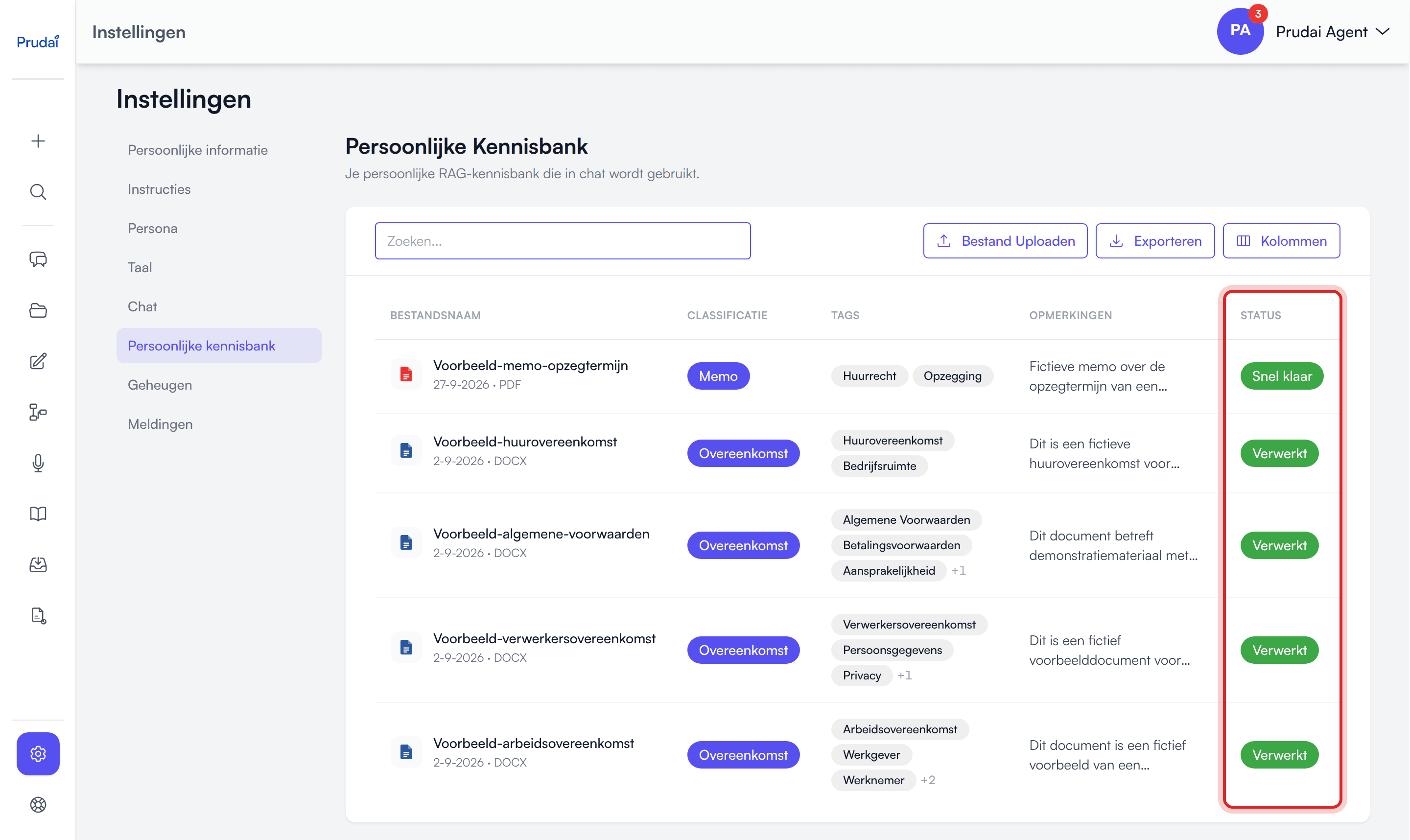
Section titled “Processing statuses”The Status column shows where a file stands:
| Status | Meaning |
|---|---|
| Pending | upload received, processing not started yet |
| Processing | processing is running |
| Chunking | the document or transcript is being split into searchable pieces |
| Embedding | the search index is being built |
| Indexing | the document is being added to the knowledge layer |
| Quick preview | the file is already searchable and usable in chat; the final refinement is still running in the background |
| Processed | the file is fully ready for search, chat and citations |
| Failed | processing failed; check the file and try again with a cleaner source |
Important:
- the assistant can use a new file once its status is Quick preview or Processed;
- in chat you can only send once new attachments have got that far;
- in chat and in Info both simply show as Processed; only the Status column shows Quick preview separately.
Preview, text and download
Section titled “Preview, text and download”Two different things are called “preview”: the preview screen and the hover preview. They do not do the same job.
The preview screen
Section titled “The preview screen”Choose Preview in a file’s menu; the preview opens in a new tab. What you see depends on the kind of file:
| File | What you see |
|---|---|
| Original (the PDF itself) or Text | |
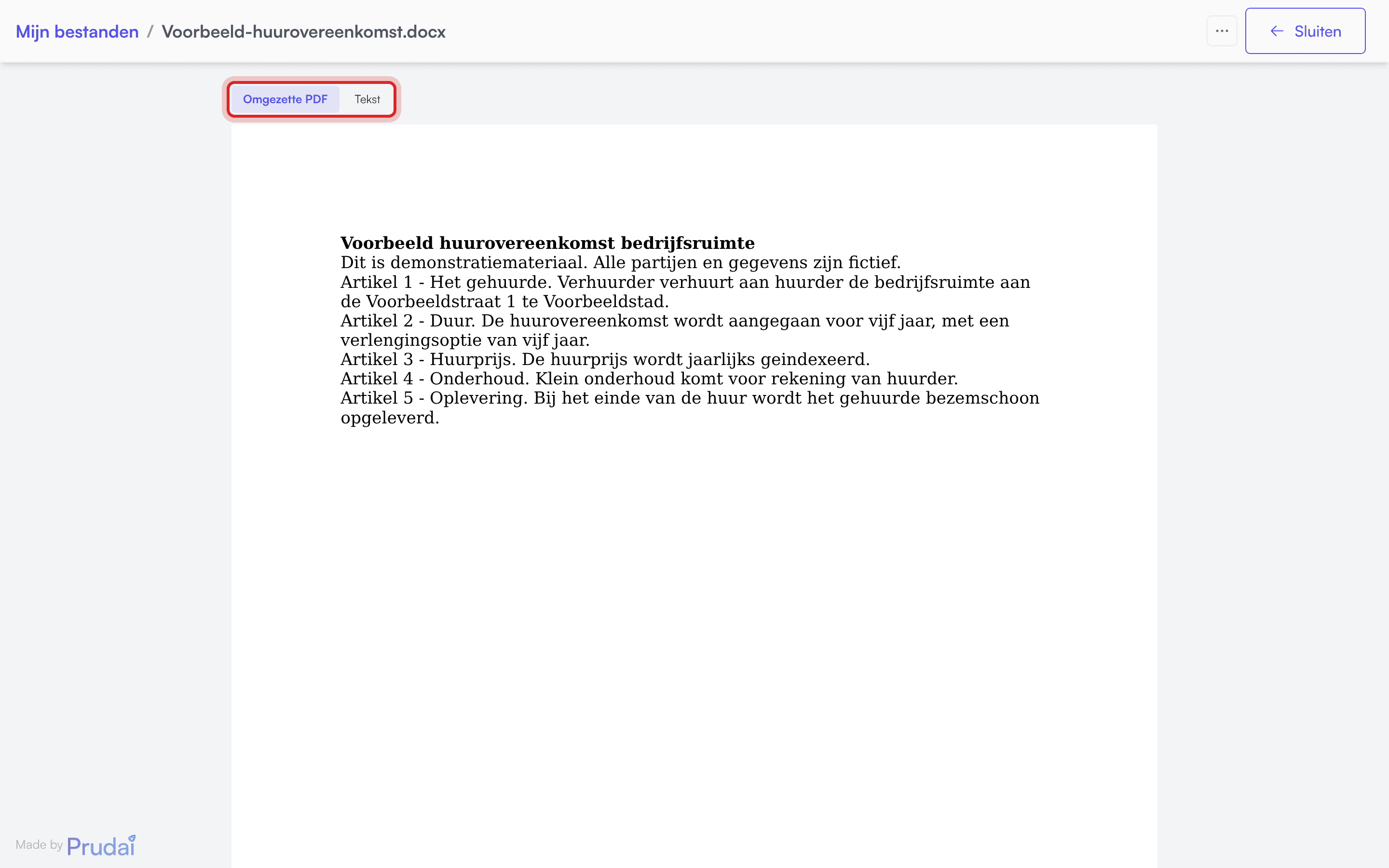
Word, OpenDocument text and PowerPoint (.doc, .docx, .odt, .ppt, .pptx) | Converted PDF or Text |
Spreadsheets (.xls, .xlsx, .xlsm, .ods) | the extracted content as text |
Common images (.png, .jpg, .jpeg, .gif, .webp, .svg) | the image itself |
Other images (such as .heic, .tif, .bmp) | the extracted text |
Text files (.txt, .md, .json, .xml) | the file’s own content |
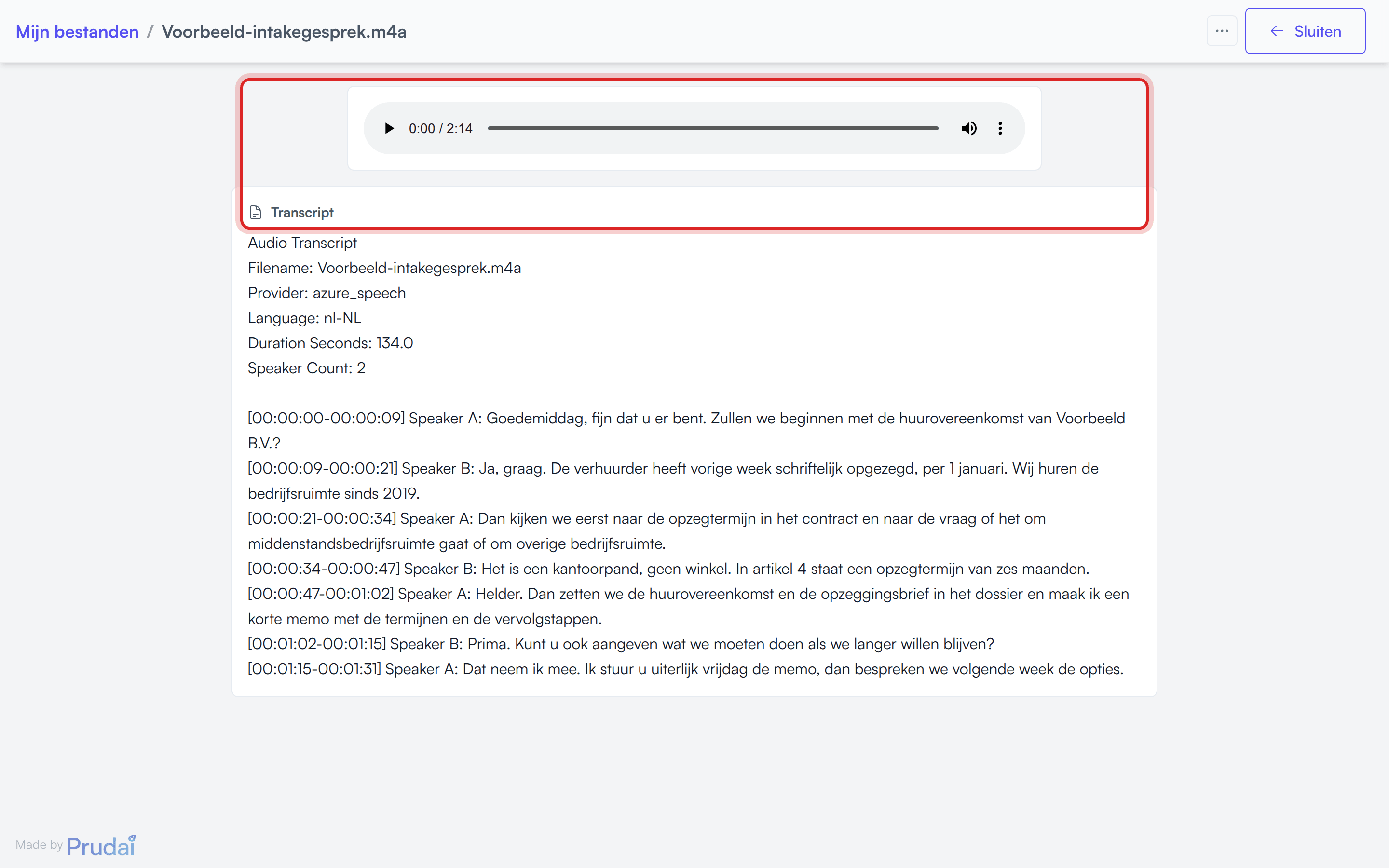
| Audio | a player with the transcript underneath; for .mp4, .3gp and .mpeg only the transcript |
| Email, transcripts, CAD, BIM and point clouds | the extracted text |
Practical impact:
- The buttons at the top switch between Original or Converted PDF and Text. Text shows what the app read from the file; that is also what the assistant searches and cites.
- If the conversion to PDF does not work, the screen shows the text straight away.
- Open an audio file, such as an
.mp3,.m4aor.wav, and you get a player plus the transcript underneath, both on screen at once. So you can read along while listening, or just search the text. - At the top right sits the ⋯ with Download and Translate, plus the Close button.
- If you have no download right on a document from an organization knowledge base, you see Read-only view: downloads are disabled. The extracted text is shown below. The menu with Download and Translate is then absent.
Open a document citation from an answer and you get the same view. The app jumps to the cited passage and highlights it. If the full passage cannot be found, it says The full passage could not be located in this PDF. If loading takes a while, you can choose Show text instead. More on Citations (login required).
The hover preview
Section titled “The hover preview”Separately there is a hover preview: a quick glance, without opening the file.
- In a dossier conversation the Attachments drawer also lists the Dossier documents. Move your cursor over one of them and a thumbnail of page 1 appears. That works for PDFs, Word, OpenDocument and PowerPoint files and common images. When no thumbnail can be produced, such as for a spreadsheet or a text file, you get a short text excerpt from the document instead.
- On a citation pill inside an answer you see a cutout of the document around the cited passage, with that passage highlighted. If the passage cannot be found, you see page 1.
The thumbnail is a glance, not a reader. To see the whole document, open the preview screen.
Metadata
Section titled “Metadata”Through Info you review the metadata; through Edit details you change it:
- File created at,
- Classification,
- Tags,
- Duration (start and end date),
- Renewal/Termination,
- Comments.
If a processed document still has no metadata, you can have it filled in from the document list with the AI button in the Comments column (Generate description with AI).
Good metadata improves:
- summaries,
- timelines,
- retrieval quality in chat.
Document actions
Section titled “Document actions”Every file has one menu with the same actions, wherever you meet that file. You open it by clicking the file name, by clicking anywhere else in the row, or through the ⋯ on the right of the row on surfaces where the name itself is not a handle.
| Action | What it does |
|---|---|
| Preview | opens the file in the preview screen, in a new tab |
| Open in Word | replaces Preview when the file comes from SharePoint and has its own address there. PDFs always keep the in-app preview |
| Info | the metadata card, read-only |
| Edit details | the same metadata, editable; only where you have that right |
| Download | the original file |
| Translate | opens Translate with this file loaded |
| Chat | starts a conversation with this file as an @ mention |
| Delete | with confirmation; the only item at the bottom |
Two things worth knowing:
- Translate is offered on every file, whatever the format. The menu does not filter on it. You only get a real translation for the formats in the table on Translate. For
.md,.jsonand.xmlyou get the translated text back as a.txt. Pick, for example, audio, an image, a.docor a.ppt, and you get an unusable.txtfile or the translation fails. - Not every surface offers every action. An action whose address cannot be resolved is left out, deliberately, so you never click a dead menu item.
Search, sort, columns and export
Section titled “Search, sort, columns and export”Document tables support:
- search and filtering,
- sorting,
- toggling visible columns through Columns,
- exporting the list through Export: Download CSV or Download Excel (.xlsx), with the metadata and status of each document.
Your column choices are remembered locally in your browser.
Important caveats
Section titled “Important caveats”- Not every supported upload format has a view of its own; for many formats the preview screen shows the extracted text.
- The hover preview and the preview screen are two different things; see above.
- Translate only supports part of the upload formats; see Translate.
- The extension decides whether an upload is accepted, not the content and not the MIME type.
- ZIP uploads can take longer because extraction happens before the inner files are processed.
- Unsupported files inside a ZIP are not partially converted; they are skipped.
- Your organization can disable uploading. Existing files then stay available: opening, downloading, translating and deleting keep working. See Restrict uploads.
- Review statuses belong to a dossier’s document table, not to your personal files.