
Prudai for Excel
Prudai for Excel is an Office add-in that does two things at once:
- a task pane with the Prudai assistant next to your worksheet, with the same chat, dossiers (projects), and source citations as the web app;
- a set of worksheet functions you use in your cells like any other Excel formula:
=PRUDAI.WETTELIJKERENTE,=PRUDAI.CONTANTEWAARDE,=PRUDAI.KAPITALISATIEFACTOR,=PRUDAI.HANDELSRENTE, and=PRUDAI.LIQUIDATIETARIEF.
Also available: Prudai For Word and Prudai for Outlook.
The assistant in the task pane
Section titled “The assistant in the task pane”Open Excel and click Prudai voor Excel in the Prudai group on the Home tab. The task pane opens on the right with the full chat: your dossiers (projects), your knowledge sources, and your settings. See Chat and Projects.
At the top of the task pane is the collapsible line Wettelijke rente · t/m 31-12-2026 (statutory interest, through 31-12-2026). It shows which period =PRUDAI.WETTELIJKERENTE supports, which rate currently applies, when the sources were last checked, and links to those sources. The add-in’s ribbon and this line are in Dutch only.
Placing a table into your worksheet
Section titled “Placing a table into your worksheet”When an answer contains a table, this is how you put it into your workbook:
- Open the Export menu on the answer and choose Place in Excel. That menu appears once the answer is complete, and Place in Excel is only in it when you work in the task pane in Excel.
- You see the Place table in Excel window with the number of rows and columns and a preview of all rows, with exactly the values that will land in Excel.
- Nothing is written until you click Place in Excel. Cancel stops.
- After you confirm, the table lands on a new, highlighted worksheet, so your existing cells are never overwritten. The worksheet gets the (shortened if needed) name of the conversation, and you see Placed in worksheet with that name.
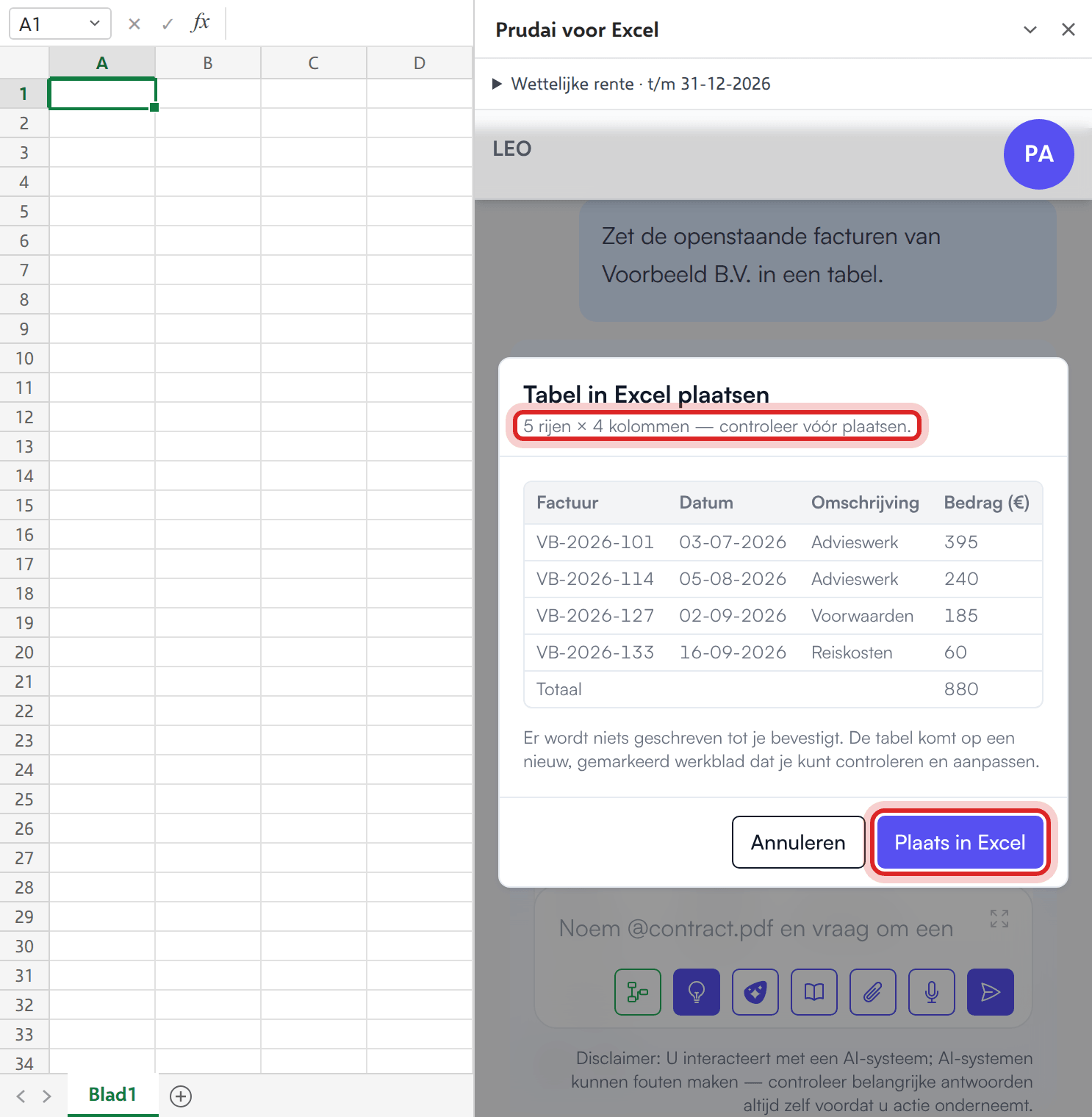
Good to know:
- Amounts and numbers land as real numbers in Excel, also in Dutch notation such as
€ 1.234,56. You can calculate with them right away. - Percentages, codes with leading zeros (such as
00123) and very long numbers stay text, so nothing is rounded or dropped. - Text that starts with
=or+lands in the cell as text and is never run as a formula. - If an answer holds several tables, the add-in picks the largest.
- After placing, you cannot place again from the same window, so a double click does not create a second worksheet.
If the answer contains no table, the add-in says No table in this answer.
The worksheet functions (=PRUDAI.*)
Section titled “The worksheet functions (=PRUDAI.*)”This is what makes Excel distinct within Prudai. The =PRUDAI.* functions are not AI estimates: they are fixed, deterministic calculations. The same input always yields the same amount, tomorrow as well, and on a colleague’s machine as well. The calculation runs inside Excel itself, so your cell contents are not sent to a server.
Just as important is what the functions do not do: where the underlying table has not been verified, they return an error value instead of a plausible-looking number. You can check an empty result; you cannot check an invented one.
| Function | What it does |
|---|---|
=PRUDAI.WETTELIJKERENTE(hoofdsom, vanaf, tot) | Dutch statutory (non-commercial) interest on a principal, art. 6:119 BW, with annual compounding and the fixed rate table. Returns the interest amount. The end date does not count. |
=PRUDAI.CONTANTEWAARDE(jaarbedrag, looptijdJaren, rentePct) | Present value of a fixed annual amount over a term, discounted at the rate you supply (payment at year end). |
=PRUDAI.KAPITALISATIEFACTOR(looptijdJaren, rentePct) | Capitalisation factor: the present value of 1 euro per year over the term, at the supplied discount rate. A useful building block in your own damages calculation. |
=PRUDAI.HANDELSRENTE(hoofdsom, vanaf, tot) | Dutch statutory commercial interest, art. 6:119a BW. Refuses by design: there is no verified half-yearly rate table, so the function returns an error value instead of an estimate. |
=PRUDAI.LIQUIDATIETARIEF(belang, punten, instantie) | Cost award under the Dutch liquidatietarief. Refuses by design: no verified points or bracket table is included. |
The function names are Dutch because the calculations are Dutch legal concepts. In a Dutch-language Excel the argument separator is a semicolon instead of a comma.
Dates may be an Excel date, or text in the form YYYY-MM-DD, DD-MM-YYYY or DD/MM/YYYY.
You supply the discount rate yourself
Section titled “You supply the discount rate yourself”CONTANTEWAARDE and KAPITALISATIEFACTOR fill in no default rate. Leave the percentage out and you get an error value, not a silent assumption. That is deliberate: in a damages calculation the discount rate is a point of debate between parties, not a product setting. Preferably work through a scenario range (for instance three columns with different percentages).
Statutory interest: period and rates
Section titled “Statutory interest: period and rates”WETTELIJKERENTE calculates over interest days from 01-01-2015 through 31-12-2026. The end date can therefore be 01-01-2027 at the latest. If your start date falls before 2015 or your end date after 01-01-2027, the function returns an error value instead of guessing a rate. Interest from 2027 onwards is only possible once the rate table has been updated.
The function uses these rates (non-commercial interest):
| From | Rate |
|---|---|
| 01-01-2015 | 2% |
| 01-01-2023 | 4% |
| 01-07-2023 | 6% |
| 01-01-2024 | 7% |
| 01-01-2025 | 6% |
| 01-01-2026 | 4% |
The sources were checked on 25-09-2026. The current state, with links to the sources, is in the collapsible line Wettelijke rente · t/m 31-12-2026 at the top of the task pane. The function’s own help text in Excel also names the supported period.
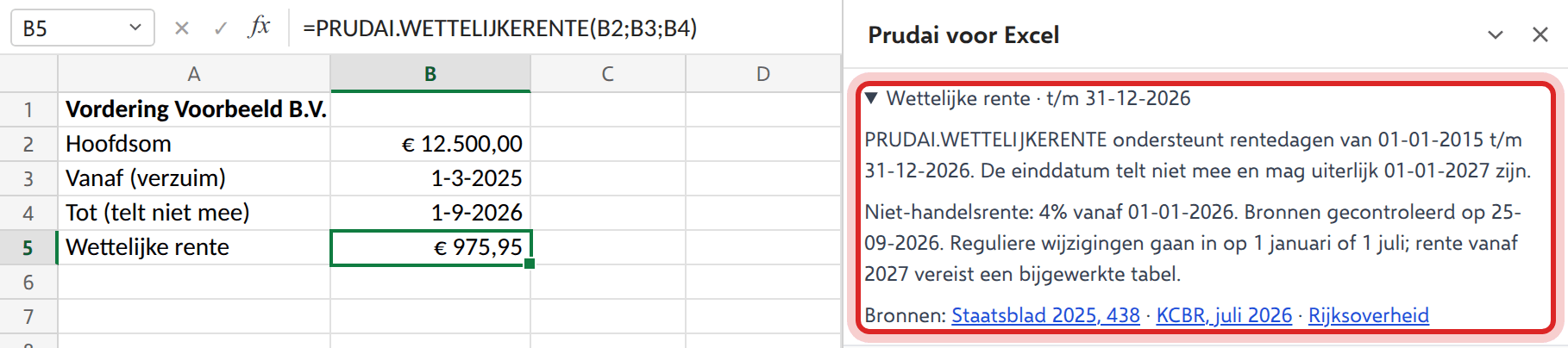
When you ask for the statutory interest in the chat, the assistant uses the same rate table and the same method: compounded per interest year from each claim’s start date, with the start date counting and the end date not. In the sources bar you then see the row Calculate the statutory interest. Only the rounding can differ: when an amount falls exactly on a half cent, Excel can come out one cent lower than the chat. The chat only calculates commercial interest, or interest over days outside the table’s period, with percentages from an official source: the assistant looks them up or asks you for them, and never estimates a percentage. Only the chat processes payments and advances, each on its own payment date (art. 6:44 BW). =PRUDAI.WETTELIJKERENTE does not take payments: the function takes only the principal, the start date and the end date, and calculates over the full principal. So do not subtract an advance from the result afterwards, as that gives too high an amount; ask for the calculation with advances in the chat. See Chat.
Getting started
Section titled “Getting started”Deployment (administrators)
Section titled “Deployment (administrators)”The add-in is made available by your administrator, via one of two routes:
- central deployment in the Microsoft 365 Admin Center (Settings → Integrated apps → Upload custom apps, app type Office Add-in, Provide link to manifest file);
- sideloading the manifest in Excel, for instance for a pilot or a test group.
The production manifest URL is:
https://app.prudai.com/excel-addin/manifest.production.xml
The steps in the Admin Center are otherwise the same as for Outlook, including the assignment choice and the wait of sometimes up to 24 hours before everyone sees the add-in. See the administrator guide for Prudai for Outlook and enter the Excel manifest URL there.
What the manifest requests:
- Office permission ReadWriteDocument (read from and write to the workbook, for instance for Place in Excel),
- requirement set SharedRuntime 1.1: the task pane and the worksheet functions run in the same runtime, so you only have to sign in once,
- the function namespace
PRUDAI, under which the five functions are registered.
Current manifest version: 1.0.0.2.
Network access: allow outbound HTTPS to app.prudai.com (the add-in itself), api.prudai.com and api.account.prudai.com (the Prudai services behind the assistant) and login.prudai.com (Prudai sign-in). If your organization signs in via Microsoft, also allow login.microsoftonline.com. That is the same list as for Outlook; see the table in the administrator guide.
Signing in
Section titled “Signing in”- Click Sign in in the task pane.
- A separate dialog window opens. SSO logins often cannot run inside embedded frames, hence the pop-up.
- Sign in with your Prudai account, the same account as for the web app.
Which personas you see in the task pane depends on your organization’s licenses. See Sign-in & persona selection. Your administrator can also switch features off for the whole organization; what that means is covered in the quick start.
Supported Excel clients
Section titled “Supported Excel clients”- Excel for Windows and Mac (desktop): task pane plus the ribbon button on the Home tab.
- Excel on the web.
The =PRUDAI.* functions are not tied to a ribbon button and work wherever the add-in is loaded.
Troubleshooting
Section titled “Troubleshooting”| Symptom | Likely cause | Fix |
|---|---|---|
Excel does not recognize =PRUDAI.… (#NAME?) | Add-in not deployed, or not yet loaded in this workbook | Check whether Prudai voor Excel appears on the Home tab; if not, ask your administrator to deploy it |
HANDELSRENTE or LIQUIDATIETARIEF always returns an error value | These functions refuse by design as long as there is no verified rate table | Verify the rate yourself and enter the amount, or use =PRUDAI.WETTELIJKERENTE. The chat can calculate commercial interest with percentages from an official source (the assistant looks them up or asks you) |
CONTANTEWAARDE or KAPITALISATIEFACTOR returns an error value | rentePct is missing, or the term is 0 or negative | Pass the percentage explicitly and a term greater than 0; the function fills in nothing |
WETTELIJKERENTE returns an error value | Date not recognized, end date before start date, negative principal, or a period outside 01-01-2015 through 31-12-2026 | Use an Excel date or text such as YYYY-MM-DD or DD-MM-YYYY, and stay within the supported period |
| Task pane stays blank | Glitchy Office webview or cache | Close and reopen the pane, restart Excel, clear the Office cache if needed; check that app.prudai.com is reachable |
| No table in this answer | The answer contains no table | Ask explicitly for a table |
| Place in Excel is missing | You are viewing the chat outside the task pane in Excel (for example in the web app), or the answer is still being written; the Export menu only appears once the answer is complete | Open the chat via Prudai voor Excel in Excel and wait until the answer is complete |
More: Prudai For Word · Prudai for Outlook · Chat · Troubleshooting & support.