
Account & RAG dashboards
Next to the web app with the personas there are two separate dashboards. You do not need them for your day-to-day work. They are meant for owners of an organization and for Prudai itself.
| Dashboard | Address | What it does |
|---|---|---|
| Account Dashboard | account.prudai.com | Organization, members, roles, subscription |
| RAG Dashboard | rag.prudai.com | Technical management of knowledge bases and documents |
Who is who
Section titled “Who is who”- Owner: manages their own organization. Most screens on this page are for you.
- Member (called User in the web app): works in the web app. There is little for a member to manage in the Account Dashboard.
- Admin: Prudai’s platform administrators. Screens that are only for them are marked “Prudai only” below.
How to get there
Section titled “How to get there”As an owner, go straight to account.prudai.com and sign in with your Prudai account. The shortcuts to both dashboards in the web app’s user menu are only there for Prudai’s platform administrators; as an owner you do not see them.
Cannot open a dashboard or screen? That is usually correct: it depends on your role.
Account Dashboard
Section titled “Account Dashboard”The Account Dashboard manages who has access and to what. What you see depends on your role.
| Screen in the menu | Who sees it |
|---|---|
| Dashboard (home) | everyone with access |
| Organizations | everyone with access; as an owner you open your own organization here |
| Billing | owners |
| Products, Partners, Users, Newsletters | Prudai only |
What you manage on the organization page
Section titled “What you manage on the organization page”Open your organization and the blocks appear in this order: identity first, then access (products and capabilities), then organization-wide settings, and finally the members.
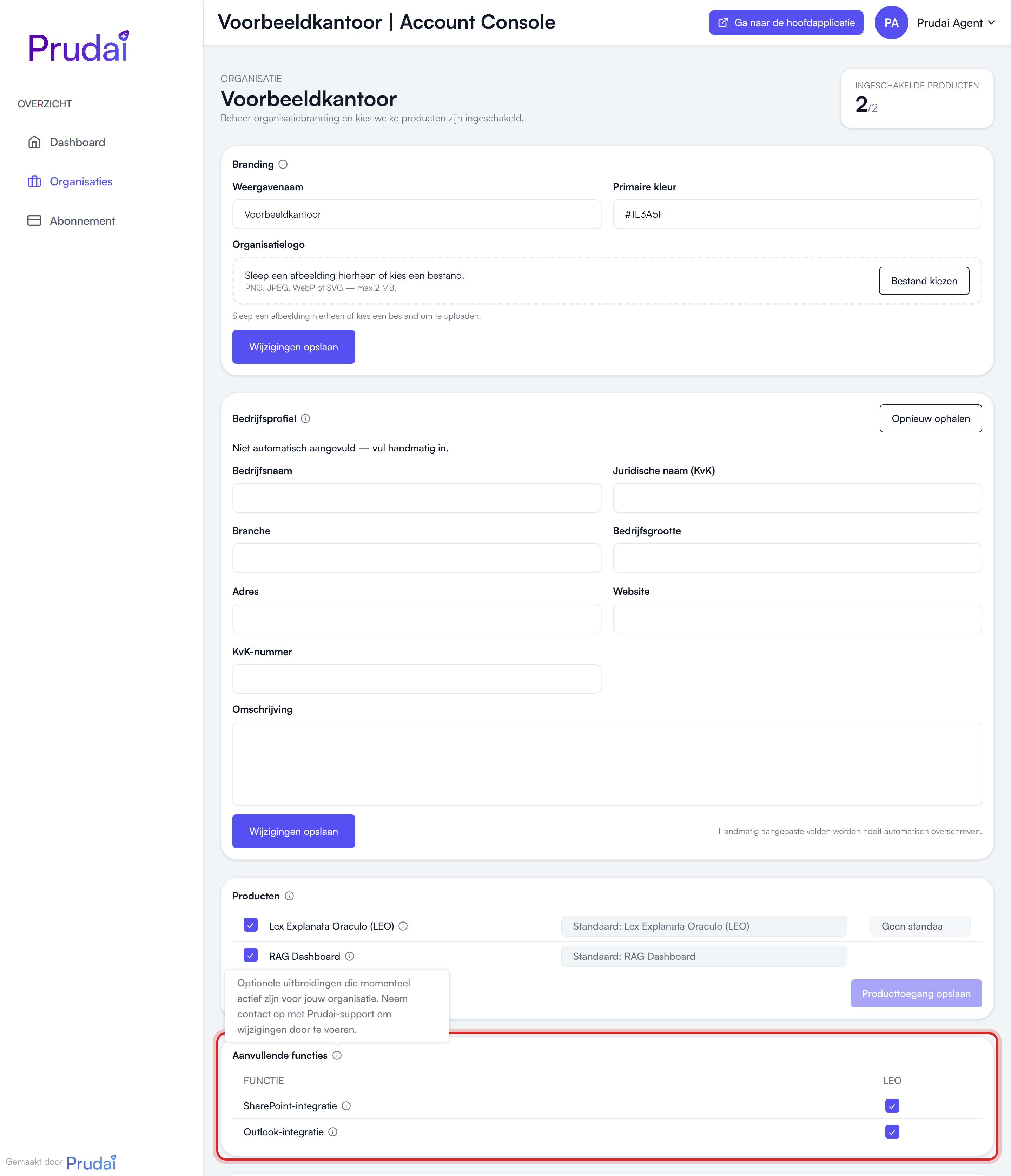
- Branding: the Display name, the Primary color and the Organization logo (PNG, JPEG, WebP or SVG, max 2 MB). As an owner you change these yourself.
- Company profile: company details collected automatically from your organization’s domain: company name, legal name (KvK), description, industry, company size, address, website and KvK number. Each field shows where it came from (Website analysis (AI), KVK Business Register, Derived from the domain or Manually entered). You can complete and correct it; manually edited fields are never overwritten automatically. Fetch again restarts the collection.
- Products: which personas are active for your organization. As an owner you only see the personas that are already switched on. Changes are made by Prudai, including a custom name per persona (Custom label).
- Capabilities: the optional features active for your organization, each with a short explanation. Think of SharePoint Integration, Restrict uploads or Partner Mode. As an owner you can view this list only; switching a feature on or off goes through Prudai support. What the restrictions do is described in What your organization can switch off.
- Partner profile: only when Partner Mode is active. Partner Mode means your firm is listed in LEO’s partner directory and the owners get the partner inbox for incoming second-opinion requests. It gives no access to another organization’s dossiers. As an owner you can view the profile; Prudai edits it.
- User product access: a matrix setting which personas each user may use. Prudai only.
- System prompt: an organization-wide instruction per persona, with a picker for the persona. The picker lists only the personas your organization has active, with your own names if those are set. As an owner you set this for your own organization.
- Members: invite colleagues with Add user, or several at once with Bulk upload (a JSON file). Per member you change the role (Owner or Member), edit details or remove the member. The last owner cannot be changed back to member. At the top you see how many seats are in use; inviting only works when a seat is free.
You can also set that same organization instruction inside the web app, via Settings → Instructions. There it applies to the persona you are working in at that moment. See Settings.
Billing
Section titled “Billing”Under Billing you see, as an owner, the state of your organization’s subscription:
- Plan & status: this block only appears during a trial, or once the trial has expired. It shows how long the trial still runs. A trial you start yourself through one of the product sites lasts 14 days and needs no credit card.
- Current plan: your plan and its status, and (if there is one) when the current period ends.
- Seats: how many of your seats are in use. If your organization has a running subscription, you change the number of seats here with Change seats, and Manage payment & invoices opens the payment portal for your payment method and invoices.
Want to take out a subscription or switch to a different one? Contact Prudai at info@prudai.com.
Newsletters
Section titled “Newsletters”Prudai composes newsletters in the Account Dashboard; that screen is Prudai only. You receive them by email. Whether you want to get them is something you set yourself in the Newsletter notification category; see Notifications.
What is not here (any more)
Section titled “What is not here (any more)”- Memory. The memory screen is not part of the Account Dashboard. You manage your memories in the web app under Settings → Memory. See Settings.
- Organization knowledge bases. As an owner you create and manage those in the web app, on Knowledge.
When do you need the Account Dashboard?
Section titled “When do you need the Account Dashboard?”- inviting a new colleague or removing someone;
- making someone an owner, or undoing that;
- adjusting seats, or viewing your payment details and invoices;
- setting an organization-wide instruction;
- changing your organization’s name, logo or color.
Does a persona or a capability need switching on or off? Contact Prudai support.
RAG Dashboard
Section titled “RAG Dashboard”The RAG Dashboard is the technical admin screen for knowledge bases and their documents. It is mainly used by Prudai. You do not need it for your day-to-day work: as an owner you create and fill organization knowledge bases in the web app on Knowledge, including the link with SharePoint.
Good to know about knowledge bases:
- File types: besides PDF and Office files, the RAG Dashboard also processes audio, CAD drawings (DWG/DXF) and BIM models (IFC).
- Audio is transcribed automatically. Speech recognition is given your organization’s name, the names of active colleagues and “Prudai”, so those are spelled correctly more often. This happens by itself and cannot be configured. It does not apply to audio in an email attachment. See also Files.
- Description: a knowledge base’s description is suggested automatically after the first document. You can always edit it yourself.
- Public knowledge bases: the public knowledge bases Prudai ships with a persona are automatically available to every organization that has that persona. They do not need to be linked per organization. Protected knowledge bases, with restricted access, are still linked by Prudai per organization. If your organization does not want to use a public knowledge base, Prudai support can switch it off for you. As a user you switch a knowledge base off yourself on Knowledge.
- Findable: documents in knowledge bases you have access to can be found in the chat and in research.
Important
Section titled “Important”- The addresses
account.prudai.comandrag.prudai.comapply to Prudai’s standard environment. - If you do not have access to a dashboard or screen, that is usually correct (role or policy).