Notifications
The Notifications page is where you read your notifications. How a notification reaches you (in the app, by email, or both) is set per category in Settings → Notifications.
What this page is for
Section titled “What this page is for”- clearing pending notifications;
- seeing what is waiting on you and what is only for your information;
- clicking through to the linked place, such as a dossier, a research run, or the partner inbox.
Where notifications appear
Section titled “Where notifications appear”- In the top right, a red number appears on your avatar as soon as you have unread notifications.
- The user menu has a Notifications row with the same number. That is a link to the notifications page, not a preview list.
- On a phone, the user menu opens as a panel from the bottom of the screen.
The number refreshes on its own, roughly every minute and whenever you return to the tab. There is no sound cue for new notifications and no setting to enable one.
Notifications from all your personas come together here, regardless of which persona you are working in at that moment. Notifications about your account and about shared knowledge arrive here too, such as a changed role or a dossier that was shared with you.
List view
Section titled “List view”The list opens on Unread. Choose All to also see what you have already read. You can also filter by category.
The list has two zones:
- Waiting on you: notifications that need something from you. Think of a workflow waiting for your approval or input, or a second opinion request that has landed with you.
- For your information: everything else, grouped by date: Today, This week, and Older.
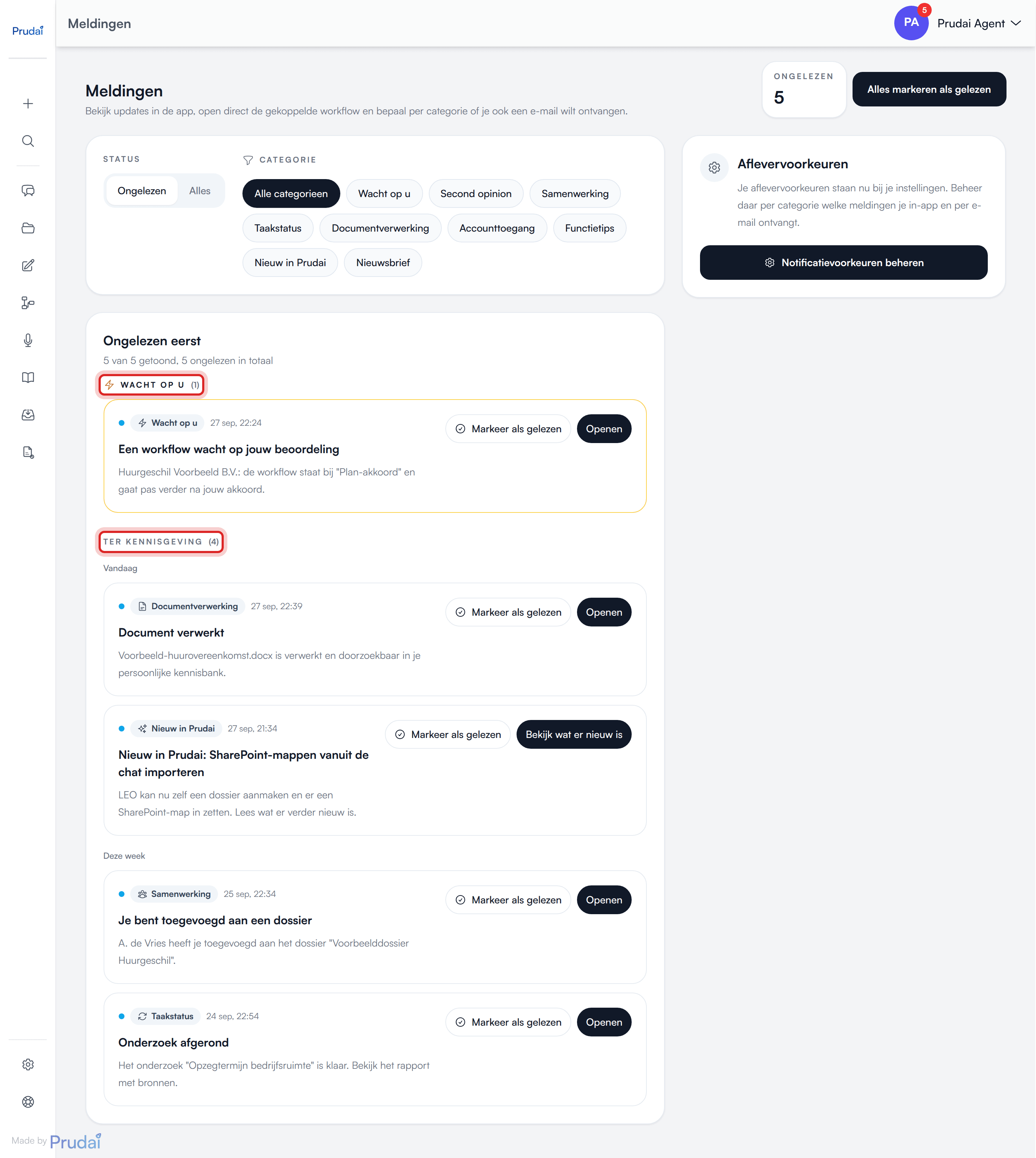
Note: the Waiting on you zone is not the same as the Waiting on you category. The zone also shows notifications from Job status and Second opinion, such as the first notice that a workflow is waiting on you. For a workflow, the Waiting on you category only holds the reminder once it has been waiting a day or more. So if you filter on that category, you see less than in the zone.
At the bottom there is a Load more button showing how many remain.
You open a notification by clicking its title or the notification itself. If the notification is still unread, the app marks it as read first. Where it applies, there are also two buttons:
- Open takes you to the linked place. This button only appears when the notification links somewhere. For New in Prudai it is called See what’s new.
- Mark as read marks the notification without opening it. This button only appears while the notification is unread.
At the top you see how many notifications are unread, with a Mark all as read button. If you have chosen a category, that button is called Mark this category as read and only applies to that category.
Categories
Section titled “Categories”There are nine categories. This is how they are set by default:
| Category | What you get | Default |
|---|---|---|
| Waiting on you | a reminder when a workflow has been waiting a day or more for your approval or input | in the app and by email |
| Second opinion | a new request in the partner inbox, a request assigned to you, clearance of the conflict check, acceptance or decline | in the app |
| Collaboration | a colleague added you to a shared dossier, project, or shared knowledge | in the app and by email |
| Job status | a research run that is ready or failed, a workflow waiting for your approval | in the app |
| Document processing | a translation or SharePoint import that finished or failed, a document that could not be processed | in the app |
| Account access | a change to your role | in the app |
| Feature tips | at most one tip a week, usually about a feature you have not used yet | in the app and by email |
| New in Prudai | a new release, linking to What’s new (sign-in required) | in the app only |
| Newsletter | the Prudai newsletter | by email only |
Not every category is relevant to everyone. You only get Second opinion if you take part in that flow, and Job status mainly if you run research or workflows.
If your organization works with MAIA (on request, sign-in required), its owners also get notifications about the daily check and the Exact Online connection. The morning notification of the daily check and the notification that the connection needs to be re-authorised fall under Waiting on you. The notification Exact Online has been connected falls under Account access.
About New in Prudai:
- with a new release you get one notification titled What’s new in Prudai, followed by the release version in parentheses, for example “What’s new in Prudai (2026-09-08)”. The release’s headline is in the notification text;
- the See what’s new button opens the changelog in a new tab;
- this category is in-app only, never email;
- if you would rather not get it, switch off In-app inbox for New in Prudai.
About Feature tips:
- you get at most one tip a week, usually about a feature you have not used yet. The email contains the concrete steps, usually with a screenshot;
- once you already use everything that qualifies for a tip, you get a few one-off general tips by email. After that the series stops;
- you never get the same tip twice;
- features that are not part of your organization’s subscription are never offered as a tip;
- a tip that points to a page outside the app arrives by email only;
- if you no longer want the tips by email, switch off Email for Feature tips.
Preferences by channel
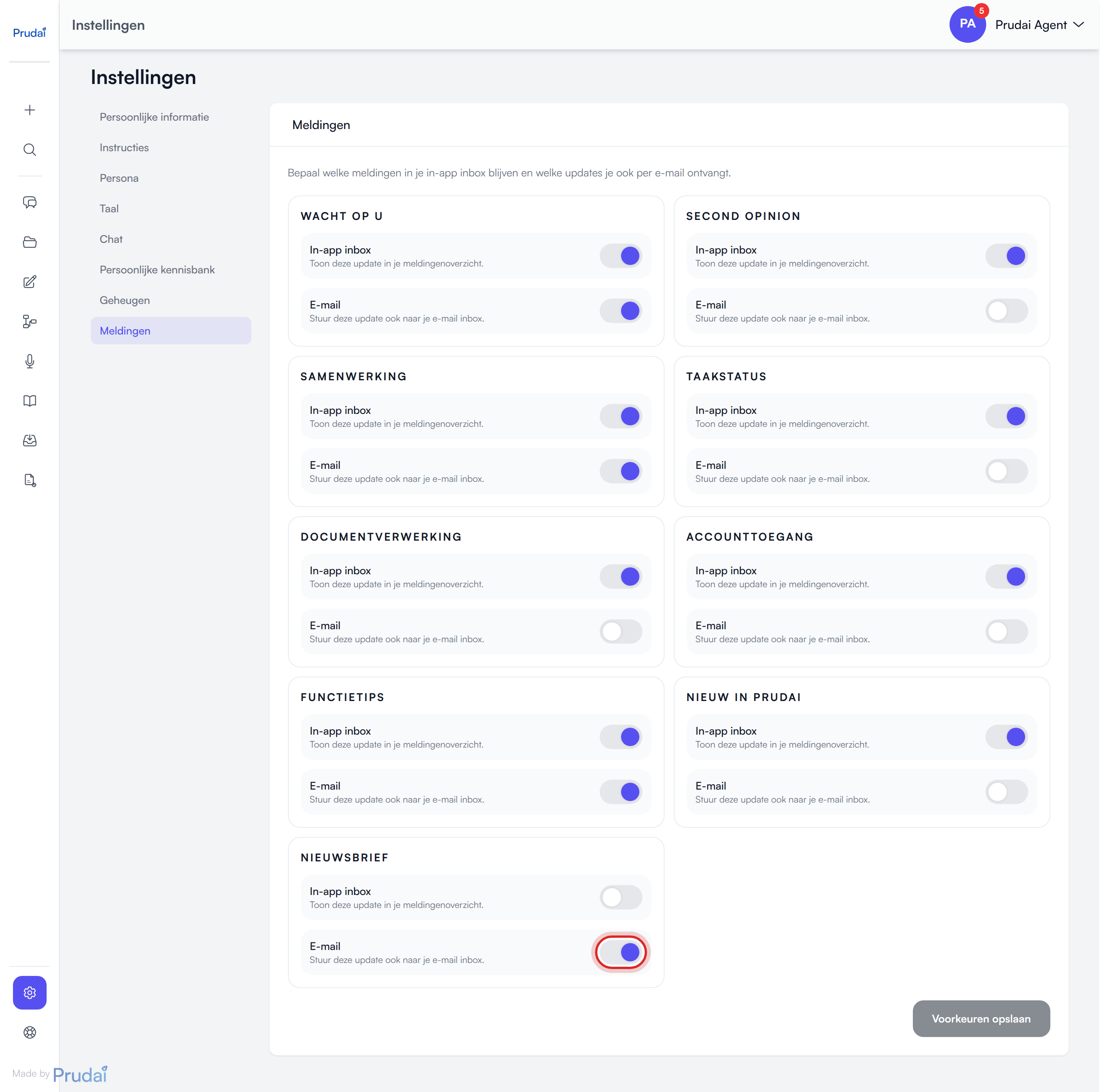
Section titled “Preferences by channel”The notifications page carries a Delivery preferences card with a Manage notification preferences button. It takes you to Settings → Notifications.
There, every category has two switches:
- In-app inbox: show the notification in your notification overview;
- Email: also send the notification to your email.
What to keep in mind:
- your changes only take effect when you click Save preferences;
- your preferences apply in all your personas;
- for New in Prudai only In-app inbox matters, for Newsletter only Email.
More: Settings.
Emails and the newsletter
Section titled “Emails and the newsletter”All emails about your notifications have a calm layout that also fits a phone screen: you do not need to scroll sideways. You get them in the language you chose in Settings → Language.
The newsletter:
- opens with a header line in the product’s color, for example “LEO · Newsletter September 2026”. Buttons and links use the same color;
- also contains the full content as plain text, for mail programs that do not show formatting;
- only goes to users of organizations that have access to Prudai, with a subscription or a running trial.
Unsubscribing from the newsletter. At the bottom of every newsletter is the link Unsubscribe or change your preferences. It takes you to the notifications page in the app. This is how you unsubscribe:
- Click Manage notification preferences.
- Switch off Email for Newsletter.
- Click Save preferences.
From then on you no longer receive the newsletter. You can also unsubscribe without the link, directly in Settings → Notifications.
Practical examples
Section titled “Practical examples”- If you never want to miss partner requests, keep at least In-app inbox on for Second opinion, and switch on Email if you like.
- If you want less noise, switch off email for Document processing but keep the in-app notification.
- If you often work outside the app, keep email on for Collaboration and Waiting on you.
Related pages
Section titled “Related pages”- Projects: many notifications open a dossier or the partner inbox.
- Workflows and research (sign-in required, LEO and LEO Fiscaal): a research run or workflow that is ready or waiting on you shows up here.
- Chat: some background actions return through notifications.
- Settings: this is where you manage delivery preferences and switch persona.